Showing posts with label Blog. Show all posts

Saturday, 19 August 2017

Five Underrated Blogging Communities to Supercharge Your Blog ~ programming info

When you mention blogging communities, are you hearing the same old networks again and again?
It is time to move on! If you want to build your blog readership and get new eyes on your content, the blogging communities listed below are just a few alternative options. While a few have been around for a bit, their capabilities and features have changed so significantly that bloggers can’t afford to ignore them.
Ready? Let’s dive in!
Here are five underrated blogging communities where smart bloggers can share content, build relationships, and supercharge their blog:

Medium

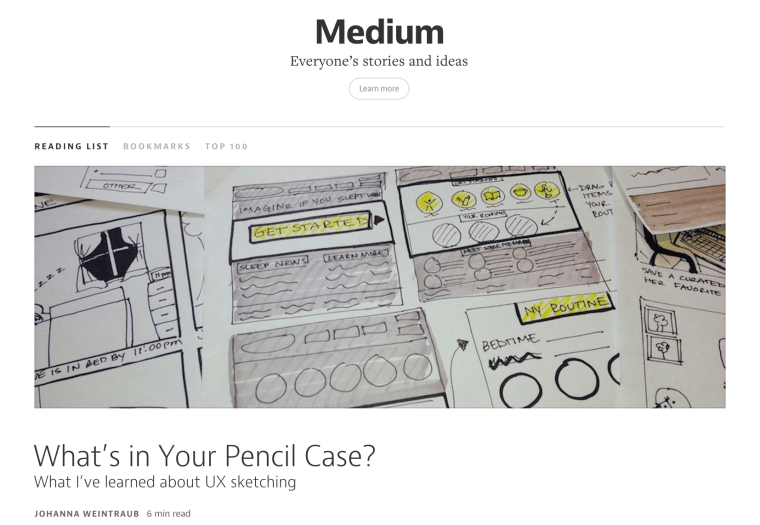
Medium is an up-and-coming blogging community created by Twitter co-founder, Evan Williams, and Biz Stone. If you are looking for an additional way to connect your writing to other writers, like-minded industry professionals, and readers, Medium is a great blogging community.
Since its launch in 2012, Medium has become a go-to destination to share content (even previously published content) and build a new network of fans and followers.
medium
One of the benefits Medium offers to potential readers is the rating of posts in terms of minutes. Each post of the site comes with a label, “X minute read” letting readers know how big a commitment they’re making by clicking a headline. If you’re a short-form writer, this might be your new destination for quick tips.
Getting started is easy; just head over to the site and sign up using either Facebook or Twitter authentication. Then, dive into their writing interface.

Benefits:

  • The startup and growth know-how of visionaries like Evan Williams and Biz Stone are sure to keep Medium relevant and growing.
  • Top 100 feature allows you to quickly see what content is resonating and learn while you build your Medium audience.
  • If you are a colloquial blogger and less business-y, this is the place to share that style.
  • Beautiful contributor profiles allow readers to follow you and get all your updates.
  • Contributor profile allows link to your website.

Why Medium Might be For You:

  • Platform: Very user-friendly interface (like a modern-day Blogspot – but 10x better) that is ideal for beginner bloggers looking to expand their reach. With Medium, you also can follow blogs, as well as be followed, so it serves as a news source as well.  Medium is also a powerful place to post pieces you might feel are off-topic for your blog, but are important messages you want to share, growing your audience in new ways.
  • Target audience: Wide.
  • Compensation: None except the awesome addition of new people who follow you, who love your writing, and can easily find your website, bringing new readers to your world.

StackStreet

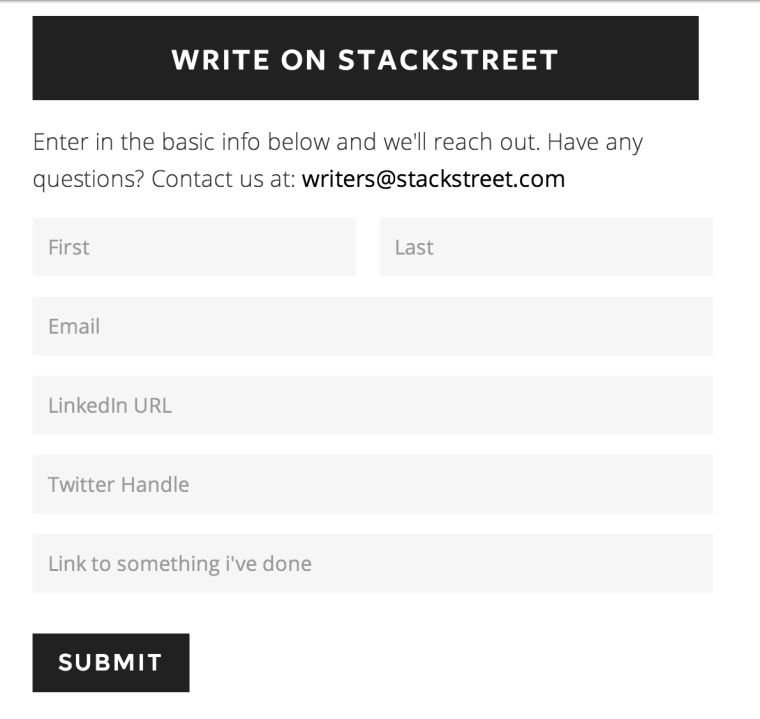
Do you regularly write about topics that would be of interest to millennials? If so, you definitely want to bring your blogging talents over to StackStreet. Unlike Medium, however, this is a by-application-only blogging community. You’ll be asked to complete a painfully short application and from there, the ball is rolling.
stackstreet
The upside to StackStreet is that, while in its beginning stages, they do offer “top contributors” (assuming they mean those with a large number of page views) who will be eligible for paid opportunities in the future. Not too shabby if you’re already writing.

Benefits:

  • Clean interface
  • Focused audience
  • Curated contributors (application-only process)
  • Ability to take your existing blog content and hone for a millennial-focused readership
  • Beautiful contributor profiles rich with social media links to build your audience

Why StackStreet Might be For You:

  • Platform: Brand new. How often do you get the chance to get in on the ground floor of a new site targeting a specific audience you crave to reach?
  • Target audience: Narrow, but meaningful. Millennials are targeted to spend $200 billion annually by 2017.
  • Compensation: Potential to earn as a top performer with additional editorial opportunities.

Triberr

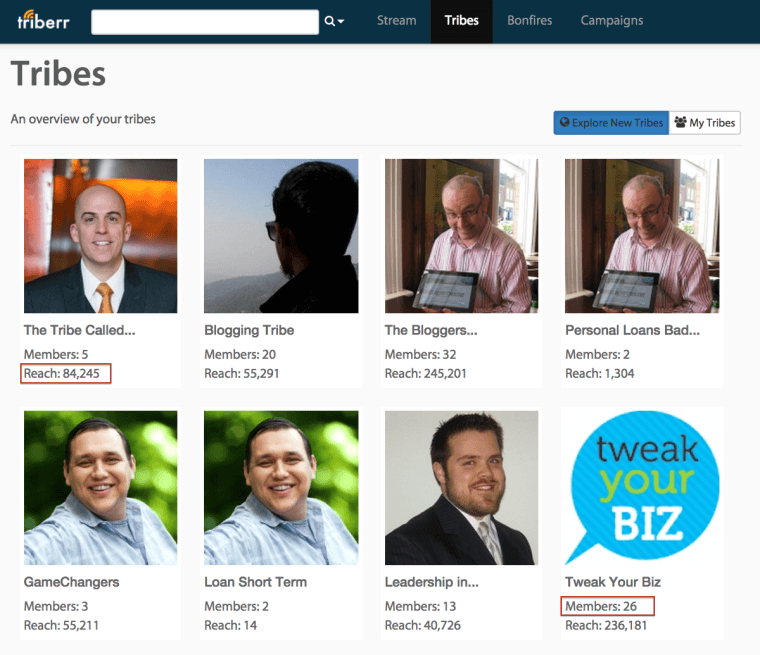
Not only does Triberr give you the chance to connect your blog with new readers, it gives you an endless stream of new content created by other savvy influencers like yourself to share with your audience. Once you create a free profile, it’s easy to begin the search for Tribes or like-minded bloggers with whom you can connect and begin sharing content.
triberr
Here, you can peruse a wide variety of exiting tribes, see how many members they have, and their reach (how widely their posts are shared).
When getting started, you can easily find Tribes by using the drop-down category function:
triberr-drop-down
The basic membership on Triberr is free and they also offer premium options starting at $8.50 per month. These premium accounts allow you to unlock more site features. Compare the paid plans here and see what makes sense for your audience growing goals.

Benefits:

  • Direct link with your blog’s RSS feed to import new posts
  • Home Page Stream that shows all of your Tribes’ content so you can quickly connect, share, and build relationships
  • Ability for users to view your posts and share directly to Twitter from Triberr
  • Ability to quickly identify those who share your posts most frequently
  • You can create, be invited to join, or ask to join Tribes (groups of bloggers) for deeper connections, and a more personalized Home Page Stream
  • crazy rich overview video explaining the site’s key blogger benefits
  • Wild tutorials designed to get you up and running on Triberr in no time

Why Triberr Might be For You:

  • Platform: Best for socially inclined bloggers who enjoy joining conversations.
  • Target audience: Wide. Ability to reach bloggers both inside and beyond your area of influence who love your content.
  • Compensation: If you sell products, imagine the benefits increased blog traffic and subscribers can bring to your bottom line. There are also options for bloggers to connect with brands and become paid brand influencers.

Google+ Communities

Yeah, you keep hearing people talk about Google+, but you’re not sold. Maybe their communities feature will finally sell you. If you are not using it to share your blog posts and connect with new influencers, the joke’s on you.
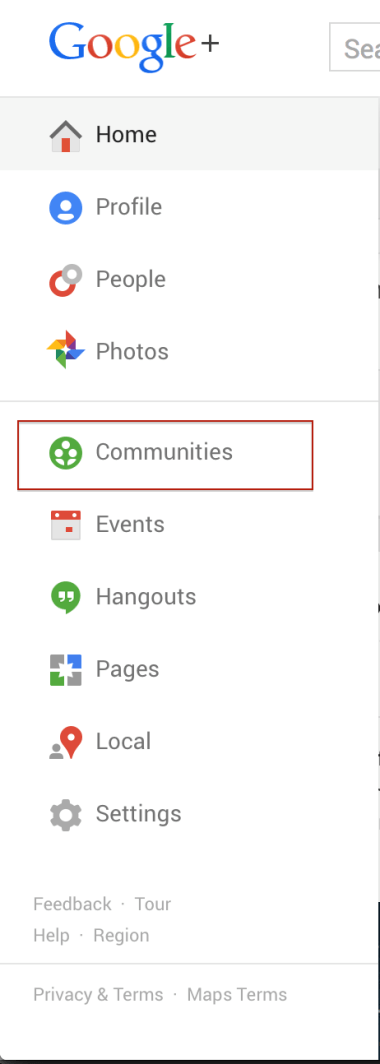
Head over to your Google+ home page and click the drop down. From there, you can access the Google+ Communities section.
google-communities
From here, you’ll be brought to the Communities home page where you can immediately see recommended communities and search for other niches where you want to build your audience.
This will bring you inside a world of people sharing content on similar subjects and access to a dedicated space to share your own content. Community members can directly +1 your post (which will update the social sharing buttons on your blog) and increase traffic to your blog from new members who are joining the Community daily.
People do not understand the power of G+ communities.
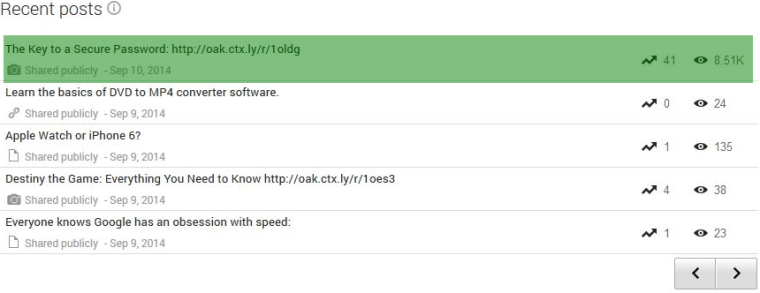
As an example, our social team recently posted an article on our iPhone card reader site about password security. Then, to give the article some love, we submitted it to the “Tech, Security & Social Networks” Google+ community. This community has over 69,770 members.
So, how did our post go (result highlighted in green)?
google plus
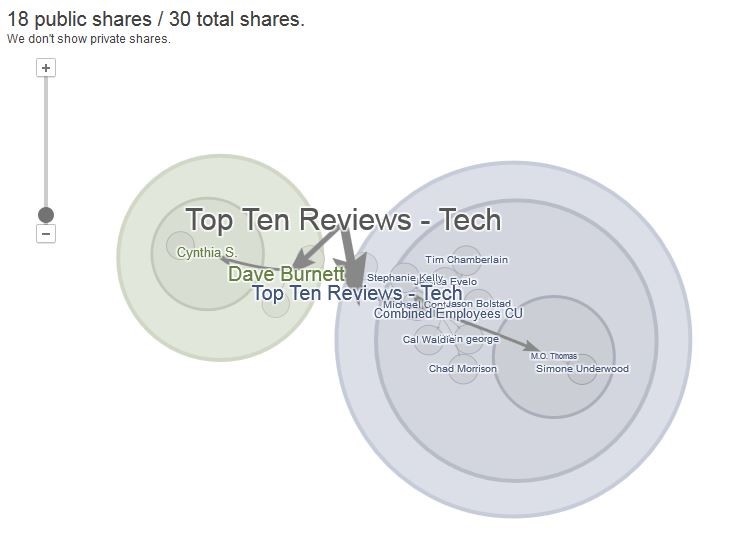
8,500+ views, and some decent “ripple effect” with the social shares, too:
google-ripples
The power of Google+ communities can be astronomical. Make it a part of your blogging syndication routine.

Benefits:

  • Ability for Community members to +1 and share your blog posts directly from your posts within the Community.
  • Rich Google+ profile for content creators and lets fans connect with you easily by sharing your blog URL and various social media profile links.
  • Ability to quickly find sharable content for your network from posts by other Community members and build relationships.
  • Offers a simple help section to assist bloggers in building or joining a community.

Why Google+ Communities Might be For You:

  • Platform: Not often used but highly powerful. If you’re a blogger with visual content, Communities and G+ in general allow for a beautiful sharing of your visual content. G+ users are most often platform devotees and active users.
  • Target audience: Wide, yet communities bring focus. G+ is still the wild, wild, west of the social networks, but bloggers can tone down the noise and turn up the meaningful relationships quickly by joining or creating communities that focus on their niche and blog areas of interest.
  • Compensation: It’s Google. No compensation, but you’ll enjoy the inflow of +1s and the ability for people to quickly comment on and share your fresh blog posts within the Community.

LinkedIn Groups

If you’re writing about anything in any industry, odds are there’s a LinkedIn Group for that topic. Simply visit LinkedIn Groups and start some keyword targeted searches for groups that focus on your areas of expertise. However, you might find the results overwhelming. I recently published a “How to Start a Blog” guide for newbies, so I went to LinkedIn Groups and searched “blogging” – and found over 886 groups:
linkedin-groups-blogging

Then, I found some active blogging groups (highlighted in green), asked to join, shared some valuable insight in the forum, then shared my post.
Just in those 2 groups alone, (8,000 + 2,000) “bloggers” are exposed to my blogging guide.
You can also take advantage of LinkedIn’s newer publishing platform to share your best blog posts. Posts that are well received can be reviewed by LinkedIn editors and then widely circulated through LinkedIn Pulse for wider visibility. LinkedIn even has a handy guide to help you get more information on their new publishing options to grow your readership and visibility.
As a note, if you see the pencil icon on your status update box , you’re already approved as a LinkedIn Publisher. They’re not currently accepting new applications, but are soon rolling the Publishing feature out to all members.

linkedin-search-bar

Benefits:

  • LinkedIn’s home page stream puts your shared blog content in front of fellow professionals.
  • It is a respected social platform that allows bloggers to share blog content and create content.
  • A better quality of leads coming to your site through your blog post shares, as you’re sharing with industry professionals, not just casual hobbyists or fans.

Why LinkedIn Groups Might be For You:

  • Platform: Longstanding, but growing richer by the month. If you thought LinkedIn was stodgy, think again.
  • Target audience: Professionals. While skill levels on LinkedIn range from green to seasoned industry professionals, this social network assures that you’ll find a readership for content from 101-level to expert industry niche.
  • Compensation: None. But LinkedIn Groups offer the chance for conversations on posts you share and to build new connections both for your blog and your professional network. It’s a “one-two punch” content platform, as you may find new guest blogging opportunities through your new relationships as well.
Read More »

Monday, 14 August 2017

New Website Blog Ko Google me Fast Rank Kaise Karaye ~ gniithelp

Jab koi user new website banata hai to uske man me SEO se related bhut sare question aate hain jaise-
  • -Meri website kab tak rank karegi?
  • -Ye Google me rank aana kab start hogi?
To friends, website ko acchi rank karne me 3 month se 6 month lag jate hain. Lekin me aaj aisi trick aapke sath share kar rha hu jisse aapki site only 1-2 din me Google me Index ho jayegi. Iske sath hi Google me rank hona bi shuru ho jayegi. Me ek bat aur batana chhta hu ki ye ek starting step hai. Isse aap ki website teji se search engine Google rank me dikhne lagegi.
improve-keywords-ranking
Kiase Laye Website ko Teji se Google Rank me-
Me aapko kuch website share kr rha hu. Is process ko Search Engine Submission bhi kahate hain, Jo SEO ka first step hai. Iska meaning hai apni blog or websites ko search engine me submit karna jisse ki wo teji se Index ho sake.
Website List-
http://www.siteworthtraffic.com/
https://www.reddit.com
https://www.w3counter.com
http://archive.is/
http://sur.ly/
http://scamanalyze.com/
http://www.pingmyurl.com/
http://www.w3snoop.com/
https://sixstat.com/
http://website.informer.com/
http://www.urlrate.com/
http://www.websiteoutlook.com/
https://www.rankstand.org/
http://mobify.site/
https://www.woorank.com
http://webns.co/
http://www.namecheckup.com/
http://www.rankolia.com/
http://www.finedo.xyz/
http://websitedays.com/
http://whois.ws/
http://whois.phurix.co.uk/
https://www.quantcast.com/
http://toolbar.netcraft.com/site_report
http://www.aboutthedomain.com/
In websites ko ek ek karke open kariye aur inme apni website ko submit kariye. Sabi website me aapke blog ko submit karne ka option diya hua hai. Apni website aise hi sabi websites me submit kar de. Fir dekhiye 1-2 din me hi aapka Blog/Website Google rank me dikhne lagega. Ye ek 100% working trick hai.
Read More »

Friday, 11 August 2017

Apps to Hide Caller Id in Android ~ gniithelp

Apps to Hide Caller Id in Android
In Smart Phones like Android already has some inbuilt feature to hide phone number. But due to some conditions in some countries, this feature is blocked. But don’t worry there are many android apps available on Android Market that helps you to hide your phone number.

Apps to Hide Caller Id in Android

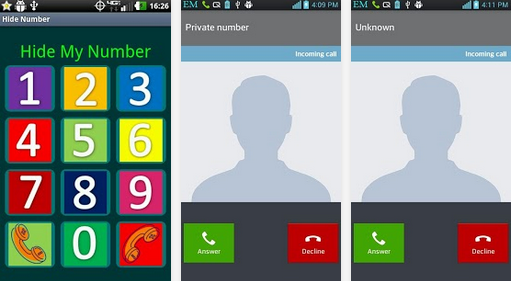
Secret Call – hide Caller ID : Its a free app available on Android Play Store to hide phone number or caller id.

Apps to Hide Phone Number in Android“Secret Call” allows you to initiate calls secretly, meaning hiding your Caller ID. This unique application gives you the choice to hide or show your number whenever you call someone.
Its very easy to Hide phone number using this Android app.
When you call someone, it will ask you hide/show your caller ID. Just select the desire option. And your number is private now.
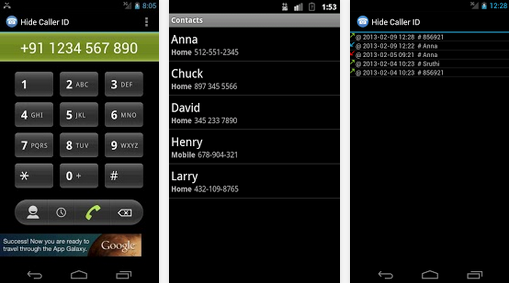
Hide Phone Number Caller ID: This app is freely available on google play. This app basically add a some pre codes to the number you are dialing. Like in my previous tutorial i told you about some codes. Now using this app you don’t have to remember those codes. It will automatically add that to your number.
how to hide caller idWhen you call using this, on called party screen it will display
Private number
– Unknown number
– Number not available
– Withheld number
– etc.
But this app does not work for India. Due to some rules and conditions of Indian Government.
Hide My Caller ID Phone Number : Another free app to hide caller id in Android. This app claims that it works for USA, Uk and India. But for me it does not work.
Apps to Hide Phone Number in AndroidA very cool app that automatically blocks your phone number from appearing on receivers’ phones – it will hide your phone number caller ID. You can let other party see only Private Number.
It supports most mobile operator.
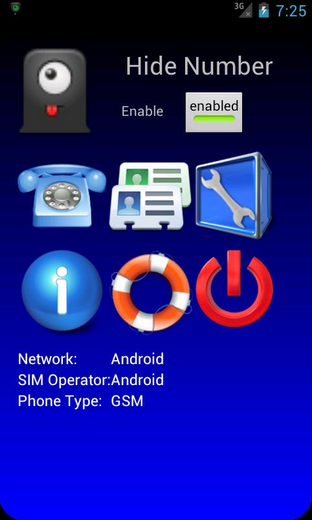
Hide Number (Caller Id): Its a premium app but had great features. It support many operator. You can set whether you want to block your caller id for all number or for some specific number.

Hide phone no

But in India, these services does not work. You have to request your service provider for this. Or you can use third party services.
Due toy strict rules of Indian Government, mobile operator does not allow you to call as a private number.
But in other countries like US, Canada these apps work very well.
Read More »

Best Battery Saver Apps for Android 2017 Upto 200% More Performance ~ gniithelp

Best Battery Saver Apps for Android
Time has been changed now we get everything so advanced in a simple manner. They were the days where we faced so many struggle when our battery is remaining dead. We do not know what to do but now there is a solution for this problem because there are so many android battery saver app’s available on google play store. Here i am giving top four best battery saver app’s for android. Even these app’s allow you to download in a simple manner and freely.
You can download these app’s over android mobiles and IOS smartphones. These battery saver app’s are simplest and easiest way to save your battery life. These app’s can keep your mobile working well in a efficiency manner. Even it’s protect when you have low battery. By using these app’s you can extend your battery life. If you do not have any idea about android battery saver app’s then simple follow here i will giving full list of Best battery saver apps for android.
best battery saver apps for android


What Does Battery Saver Mode Do?

At the point when Battery Saver is empowered, Android will diminish your gadget’s execution to spare battery control, so it’ll play out somewhat less rapidly yet will remain running longer. Your telephone or tablet won’t vibrate to such an extent. Area administrations will likewise be confined, so applications won’t utilize your gadget’s GPS hardware. This means Google Maps navigation also won’t function. Most background data usage will also be restricted. Email, messaging, and other types of app that rely on receiving new data may not update until you open them.
Battery Saver mode isn’t something you need to empower constantly. While more battery life sounds awesome, killing these elements accompanies huge drawbacks. This mode brings down execution, forestalls foundation match up, and confines GPS get so that’s fine if the alternative is your phone dying, but it’s not something you want to deal with all the time–just when you’re really desperate to eke out a bit more battery.

Best Android Battery Saver Apps 2017

There are so many battery saver apps available in google play store. But we always want to choose best one that’s why here i am giving full information about top 4 best battery saver apps for android 2016. Now you can easily choose best one for your smartphone. So you can manage your battery life in simple way.

1) Greenify

If you have installed more apps on your smartphone or tablet and it become slower and battery hungrier then you must have to try Greenify app to manage your battery life. It is a free energy saver app available for all android and iOS users. It helps you to identify and put the misbehaving apps into hibernate while you are not using that apps.
Greenify enable you to distinguish and put the acting up applications into hibernation when you are not utilizing them, to prevent them from slacking your gadgetand siphoning the battery, interestingly! They can do nothing without unequivocal dispatch by you or different applications, while as yet saving full usefulness when running in frontal area, like iOS applications.


2) Battery Doctor

Battery Doctor is free battery saver apps for android and iOS which allows you to remove background running apps and extend the ba
ttery life. It stops power consumption with single tap on your device. You can easily get the updates of your charging options and status. It provides you to full control of power consumption apps. You can easily find out what is draining your power and easily stop it.
Battery Doctor is a FREE battery saving app. Our special 1-tap optimization feature stops power-consuming apps with a single tap. The feature are Power Shortcut which kills tasks with one tap, Accurate battery remaining time, Accurate charging time remaining, Schedule power saving modes for work/class/sleep and more, Unique 3 Stage Charging System. Wi-Fi/Data/Bluetooth toggles Brightness control. And Battery temperature.

3) Battery Power

Battery power is another free application to get the battery status on your android or iOS gadget. It has an in-assembled novel innovation to boost your battery life. The best component of this application is to show remaining utilization time while you are utilizing distinctive applications on your smartphone. It additionally has recorded some best tips to expand your battery life while you are voyaging and don’t have any charging point or power reinforcements close you.
Battery Power is an ultimate app, which can help to boost your battery charging speed by 30-40%. APP automatically activate when connect your charger and it will boost your charging speed. How Fast Battery Charger works, you review it through this app. The feature are One-tap battery optimizer, Activity remaining time estimator, App manager for stop/uninstall the user and system apps , per-mode and custom mode for set battery manager, Widget for saving the battery life up to 4x.

4) Avast Battery Saver

Avast is as of now a famous choice for some individuals who need to manage and control different parts of their smartphone and the Avast Battery Saver hopes to give a similar kind of administration to your smartphone’s battery. In a comparable vein to Battery Doctor, this one will give more point by point data about what is expending your battery and help you to direct the activities of those applications and administrations.

The all new Avast Battery Saver 2.0 is less demanding to utilize and more capable than any time in recent memory, enabling you to stop applications with one tap, accelerate your gadget, and spare battery life. Press up to 20% more life from your battery by ceasingapplications that keep running in the background.Don’t let your telephone let you down. Perceive what number of applications you have running out of sight and get standard, precise assessments of how much time you have left on your battery.

5) Batter Optimizer and cleaner

Not at all like a portion of alternate applications on this list, Battery optimizer and Cleaner offers various included esteem highlights past simply the battery. So this one will furnish you with choices like cleaning the memory to help enhance speed and furthermore the capacity to screen your
portable information utilization, and additionally, all the battery sparing deceives you would anticipate.
This across the board telephone sponsor application gives you Brisk Lift it enhances and gives a moment synopsis of your smartphone’s execution with a one tap help, BATTERY SAVER enhances your smartphone’s battery life and battery use by killing superfluous exercises, settings, and power-devouring applications, Stockpiling CLEANER arranges for storage room with the Android garbage cleaner by evacuating covered up and pointless records, including brief documents.

6) Battery Magic

Battery Magic is a free Battery saver applications for bot
h android and iOS clients. It has an astonishing battery lift, information and battery investigation include with the goal that you can without much of a stretch get the points of interest of the rest of the battery and remaining time for various applications. It has additionally a paid form called “Battery Enchantment World class” which has some unique and astonishing components to support your battery life.
Battery Power Saver is a FREE battery sparing application that makes your battery last more and can enable you to get up to have more battery life for your Android telephone. The part of this versatile was Spare Power Alternate way which kills errands with one tap, Kill applications when screen is off, Exact battery remaining time, Precise charging time remaining, Calendar control sparing modes for work/class/rest and the sky is the limit from there, One of a kind 3 Phase Charging Framework, Wi-Fi/Information/Bluetooth flips, Splendor control, Battery temperature.

7) Battery Saver

Battery Saver is a just excellent and simple to utilize an application to check the battery status of your Android or iOS gadget. It
 is allowed to utilize and gives you exact battery rate see. You can likewise check your Slam use and status utilizing this application. It has a stunning component as movement remaining time estimator which shows the rest of an opportunity to utilize diverse applications introduced on your gadget.
Battery Saver is a FREE battery sparing application. Our extraordinary 1-tap advancement includes stops control expanding applications with a solitary tap. The components accompany Spare Power Alternate way which kills assignments with one tap, Kill applications when screen is off, Exact battery remaining time, Precise charging time remaining, Calendar control sparing modes for work/class/rest and that’s only the tip of the iceberg, Extraordinary 3 Phase Charging Framework, Wi-Fi/Information/Bluetooth flips, Splendor control, Battery temperature.

8) Battery Manager

Battery Manager is another free and easy to understand battery saver applications for Android clients. It has a side menu which enables you to rapidly bounce starting with one screen then onto the next as per your necessity. You can without much of a stretch get the present status of your battery and furthermore get other data including level, temperature, voltage, and others. It is completely adaptable and resizable gadget application with the goal that you can keep the fundamental data on your home screen.

Battery manager gives all of you data about your telephone battery and its status, nitty gritty battery insights, and data, for example, voltage, temperature, limit, etc.Simple Battery Administrator + Gadget encourages you to build battery life and gives you full control of uses and administrations running on your smartphone. All consents required by the application are important to deal with Wifi, 2G, 3g, 4g versatile information, splendor level on your gadget and lift battery life by closing them down when not utilizing, and for impairing applications that deplete the battery.

9) 360 Battery

A large portion of the applications that are intended to enhance battery life take an “observing” approach and 360 Battery is the same. This one hopes to screen what is going on your cell phone and give data back to you so you can better control the levels of battery utilization and utilization. This one additionally comes stacked with other preset modes which you can apply and let the application do all the work – including immediately slaughtering battery-parched applications before they even dispatch out of sight.
Alter your depleting settings and incapacitate superfluous applications that deplete your battery! In a flash find and stop control devouring applications with a solitary tap. The primary element was One tap control saver, Propel control sparing application, Associate awakens control saver, control sparing mode, Battery control estimation and so forth. In addition, 360 battery saver additionally is an application saver, it encourages you to deal with all depleting applications, stop futile applications and abatement the charging time.Free download this battery saver application exhaustively with just a single tap to broaden your gadget’s battery life.

10) ShutApp

This application which adopts a significantly easier strategy to enhancing battery life. As the name recommends, ShutApp is about the closing down of applications as an approach to drag out the battery. So whether this is closing down applications which devour a considerable measure of prompt battery or closing down those which shopper battery over a long stretch (by running out of sight), ShutApp will close those applications down for you.
These are what make ShutApp a phenomenal battery saver.The best battery-sparing application accessible with one tap and rapidly close battery-depleting applications. Shut applications won’t get restart, Auto close down foundation applications on UNrooted phones., Blockinformation stream when the smartphone is not being used and just applications in the dynamic rundown approach the system. (This component requires to introduce Rest, the other application created by us.)Receive warnings and brisk access to close down applications by means of coasting Magic Ball.

11) Snapdragon

Snapdragon is a stunning battery master application for a
ndroid clients which causes you to broaden battery life. It has a clever element which encourages you to deal with your applications running in the foundation of your Android gadget. You can undoubtedly improve your gadget to broaden the battery life of your gadget. It doesn’t require client setup to deal with the battery life or rate.
Snapdragon™ BatteryGuru can broaden battery life by keenly rolling out improvements that assistance streamlines gadget usefulness in cell phones with Snapdragon portable processors. This application: Conveys longer battery existence with fewer charges, Astutely figures out how you utilize your Snapdragon-fueled cell phone and improves your gadget without debilitating cell phone usefulness, Requires no client design – Snapdragon BatteryGuru naturally learns and changes the cell phone settings.

12) DU Battery Saver

DU Battery Saver is another free battery saving application for android and iOS which enables you to build the battery life. It has an astonishing pre-set battery control administration mode which enables you to take care of all battery issues and broaden your battery life. Extraordinary compared to another element of this application is its chill off component which works by deliberately observing to cripple unusable applications to ensure your hardware.
DU Battery Saver and Battery Screen and Battery Life and Solid Battery Charge is the most straightforward and least demanding approach to keep your Android telephone functioning admirably when you require it, and secure against poor charging, battery hoarding applications, and disregarded gadget settings that abbreviate your battery life. The elements of this application Power Set aside To 60% and Broaden Battery Life, One-Tap Battery Saver and Battery Streamlining agent and Battery Saver, Telephone Cooler, Garbage Cleaner, Battery Saver and Battery Screen, Healthy Battery Charge And so on.

13) Battery HD

It is a flawless battery screen application for android and iOS clients with rich outline and simple to utilize. You can without much of a stretch know how long you have left to use diverse applications introduced in your gadget. You can without much of a stretch get the alarms for various applications in various ways. A standout amongst other component of this application is to alarm you when the battery is completely charged showing the right esteems for your gadget.
This is the ideal battery screen for your telephone or tablet. It is basic, delightful and can be adjusted uniquely for your device.Instantly know how long you have left to listen: to music, Watching video, Chatting on the telephone, Web Perusing ( WiFi/Edge/3G/4G ), Standby, Time left to energize, Time to utilize Drove Electric lamp, 2D and 3D Recreations, Perusing books, GPS route, Video visit, Taking photographs, Recording recordings And so on.

14) Go Battery Saver & Power Widget

Another prevalent choice is GO Battery Saver and this one additionally accompanies various components particularly intended to enhance your battery’s life once a day, including a helpful gadget which offers simple to see data on the execution of your battery. This one will likewise hope to give you evaluated battery life funds on different angles, as for example, how much your battery could be stretched out by closing down Bluetooth when it is not being utilized.
Battery Saver is equipped for broadening your battery life. Fundamental components of this battery in addition to incorporate power saving mode, shrewd sparing, flip control, control testing, and so on. Never stress over finding a charger amidst the day again.Main Components of this application precisely appraises battery remaining time, Gadget that enhances battery execution with customized UI configuration, Shows how much battery power will be broadened on the off chance that you close down WiFi, Bluetooth, and so on, Battery utilization streamlining in only a single tick, smart battery save.

15) Repair Battery Life Pro

It is a free battery repair application for android users by Aracely which improve the season of your battery. You can without much of a stretch utilize this a single tick application to augment the battery life of your android gadget. It is light weight and simple to introduce application you can without much of a stretch utilize this application to enhance your battery time substantially more. It has empowered temperature Repair Battery Life is a free and expert application to upgrade the season of your battery, it is a “Single tick application”, natural, quick and simple.
Utilize Battery Repair Life and disregard energizing your telephone each day.Features: On Snap Application framework, Enhance your battery time utilizing it just once per week,24/7 Support, Temperature marker, voltage pointer, Innovation Pointer and significantly more.Marker, innovation pointer, voltage marker and others.
Also Check
Conclusion

The above battery saver applications offer something for everybody, so even the less technically knowledgeable ought to have the capacity to discover an application that will suit their requirements. It has been hard to limit the tremendous measure of battery saving applications down to only 10, yet the greater part of the above offer a strong execution and a wide selection of components. Best of all maybe, is that they are for the most part allowed to download. In the event that you know whatever other battery saver applications for Android that you consider deserving of being among the best.
Read More »