Showing posts with label java world. Show all posts

Wednesday, 2 August 2017

Broadcasting Chatserver Project java ~ gniithelp

Broadcasting Chatserver Project


Objective/ Vision

Users can interact to each other. They can share information to all others.

Software Requirement to run this project

  1. JRE

Hot to run this project

Run the server first, write: java MyServer
Now click on the executable jar file MyClient as many as you want. It will open different dialog boxes. Now try to communicate with each other.
click on the login button and enter your name, now you can share information.

Welcome Page
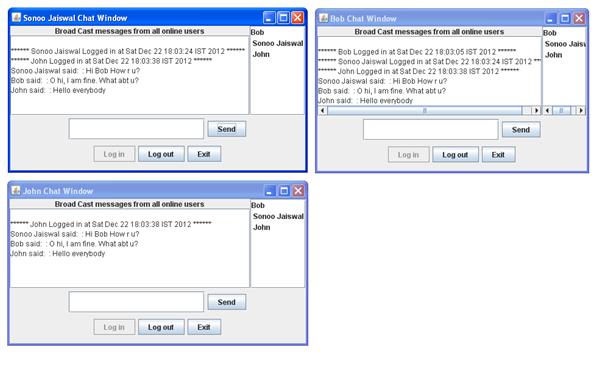

credit :- javatpoint
Read More »

Pharmacy Project java ~ gniithelp

Pharmacy Project


The description of the project will be available soon. But you can download the project.

Non-Functional Requirements

  1. Secure access of confidential data (user?s details). SSL can be used.
  2. 24 X 7 availability
  3. Browser testing and support for IE, NN, Mozila, and Firefox
  4. Reports exportable in .XLS, .PDF
  5. Create a detailed UML diagram (Component, Sequence, Class) for the system and its sub-components

User Interface Priorities

  1. Professional look and feel
  2. Use of AJAX atleast with all registration forms and with every search option and at the id of each searched result with onmouseover event.
-->

Tools to be used

  1. Use any IDE to develop the project. It may be Myeclipse / Eclipse / Netbeanse.
  2. Oracle 10g for the database.
  3. Server: Apache Tomcat/JBoss/Glassfish/Weblogic/Websphere.

Front End and Back End

  1. Front End: JSP, JDBC, Javascript, AJAX
  2. Back End: Oracle

How project works?

To get detail explanation about project download the document file. It includes snapshots with explanation.

Software Requirement to run this project

  1. You need to install an IDE Eclipse / Myeclipse / Netbeans.
  2. Oracle 10g database. Here, we are using system for the username and oracle for the password.

Hot to run this project

Import the project on the IDE and run it. All the tables will be created automatically.

Welcome Page


credit :- javatpoint
Read More »