Material design is a comprehensive guide for visual, motion, and interaction design across platforms and devices. Android now includes support for material design apps. To use material design in your Android apps, follow the guidelines defined in the material design specification and use the new components and functionality available in Android 5.0 (API level 21) and above.
Android provides the following elements for you to build material design apps:
The material theme provides a new style for your app, system widgets that let you set their color palette, and default animations for touch feedback and activity transitions.
Dark material theme Light material theme
Lists and Cards
Android provides two new widgets for displaying cards and lists with material design styles and animations:
The new RecyclerView widget is a more pluggable version of ListViewthat supports different layout types and provides performance improvements.
The new CardView widget lets you display important pieces of information inside cards that have a consistent look and feel. For more information, see Creating Lists and Cards. View Shadows In addition to the X and Y properties, views in Android now have a Z property. This new property represents the elevation of a view, which determines:
The size of the shadow: views with higher Z values cast bigger shadows.
The drawing order: views with higher Z values appear on top of other views.
The new animation APIs let you create custom animations for touch feedback in UI controls, changes in view state, and activity transitions.
These APIs let you:
Respond to touch events in your views with touch feedbackanimations.
Hide and show views with circular reveal animations.
Switch between activities with custom activity transitionanimations.
Create more natural animations with curved motion.
Animate changes in one or more view properties with view state change animations.
Show animations in state list drawables between view state changes.
Touch feedback animations are built into several standard views, such as buttons. The new APIs let you customize these animations and add them to your custom views.
LinkedIn is one of the most popular social networking platforms available today. LinkedIn users can share status updates, respond to topics of interest, read the latest updates from contacts and companies, and participate in group discussions about topics that interest them.
The popularity of social networking platforms like Facebook, LinkedIn, and Twitter means that mobile app developers are tightly integrating these services with their applications to allow users to share content on these sites without ever leaving an application.
Overview of SDK
The mobile SDK for Android increases your app's time to market by providing out-of-box support for LinkedIn natively inside your Android applications.
The Mobile SDK for Android requires the official LinkedIn Android application is also installed to support the SDK's capabilities.
The minimum supported version is Android 4.4.2 (API 19).
SDK Features
Single sign-on (SSO) authentication, in conjunction with the LinkedIn mobile app.
A convenient wrapper for making authenticated calls to LinkedIn's REST APIs.
"Deep linking" to additional member data in the LinkedIn mobile app.
Sample application that demonstrate best-practice implementations of all of the SDK's features.
Please find steps below for LinkedIn integration in Android.
Step - 1 Create Application
To Integrate LinkedIn in your mobile application, you need to create a new application using LinkedIn Developer’s Account.
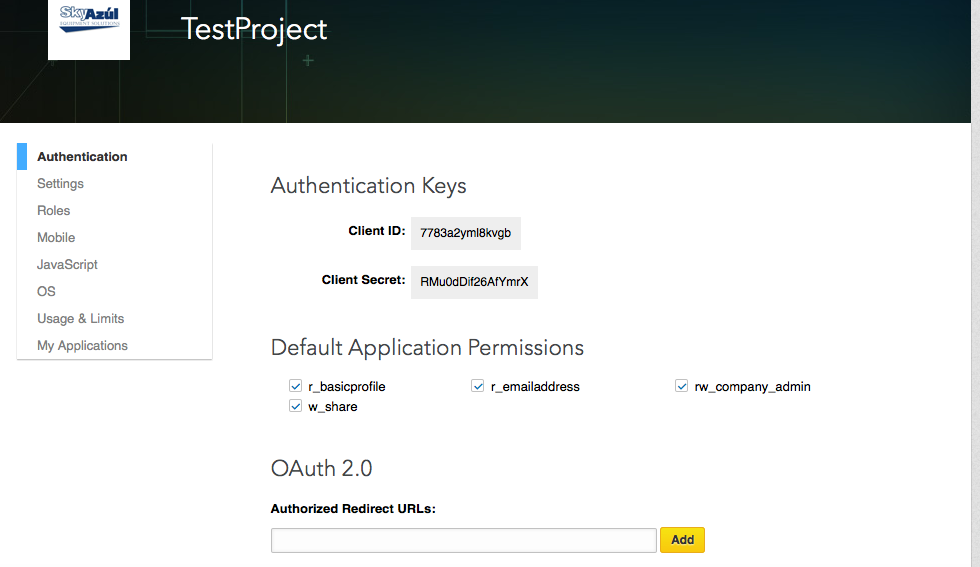
Create application from LinkedIn developer account. https://www.linkedin.com/developer/apps
Step - 2 Set the Application Permission
Now, you need to set the Default Application Permissions. And to do that, you have to select check box “r_basicprofile” and “r_emailaddress” and click on the “update” button to set the permission.
Step - 3 Download Mobile LinkedIn SDK
Go to https://developer.linkedin.com/docs/android-sdk and download a Mobile SDK for Android.
Step - 4 Generate Hash Key
We need to generate a hash key. This generated Hash key will integrate your app with Linkedin account.
Go to https://www.linkedin.com/developer/apps
Select your application name and click the Mobile tab.
Add the package name and generated hash key in your LinkedIn Application.
This hash key will authenticate your mobile application.
Members assume that they will have control on what content is posted and shared on their behalf. You should assure users that you will not post or send mail on their behalf without their consent, and give them the option to edit content before it is posted or not share content if they choose.
Permission Request
You should educate users on which permissions you are requesting and how this data will be used. LinkedIn does not support incremental permission request, so all permissions must be granted during the authorization step.
Requesting too many permissions may cause users not to authorize your application, so you should only ask for the permissions that you need.
Authentication
Whenever possible, remind the user that they are logged into your application by displaying their name, portrait, and/or account settings.
You should also avoid multiple log in prompts.
Cache the user's access token after they grant your application and do not bring the user through the authentication flow again unless they log out or the access token expires or is otherwise invalid.
You should allow the user to log out, and when they do log out you should destroy the access token you had been granted.
Cancelling in-progress requests
During your application's workflow, you may wish to cancel any in-progress API requests. This is done by calling APIHelper.cancelCalls() method.
Using ProGaurd with your application
If you intend to use ProGuard on the release build of your mobile application, you will need to add the following lines to your project's proguard-project.txt file to preserve information required for the SDK to function properly:
proguard configuration
-keep class com.linkedin.** { *; } -keepattributes Signature
Mobile vs. server-side access tokens
It is important to note that access tokens that are acquired via the Mobile SDK are only useable with the Mobile SDK, and cannot be used to make server-side REST API calls.
Similarly, access tokens that you already have stored from your users that authenticated using a server-side REST API call will not work with the Mobile SDK.
Partnership Program
All other APIs (e.g. Connections, Groups, People Search, Invitation, Job Search, etc.) will require developers to become a member of one of our partnership programs.
Partnering with LinkedIn provides you with additional API functionality & data access, increased call limits & dedicated support.
Applications are only accepted when we feel that they're providing value to members, developers and LinkedIn.
In Smart Phones like Android already has some inbuilt feature to hide phone number. But due to some conditions in some countries, this feature is blocked. But don’t worry there are many android apps available on Android Market that helps you to hide your phone number.
Apps to Hide Caller Id in Android
Secret Call – hide Caller ID : Its a free app available on Android Play Store to hide phone number or caller id.
“Secret Call” allows you to initiate calls secretly, meaning hiding your Caller ID. This unique application gives you the choice to hide or show your number whenever you call someone.
Its very easy to Hide phone number using this Android app.
When you call someone, it will ask you hide/show your caller ID. Just select the desire option. And your number is private now.
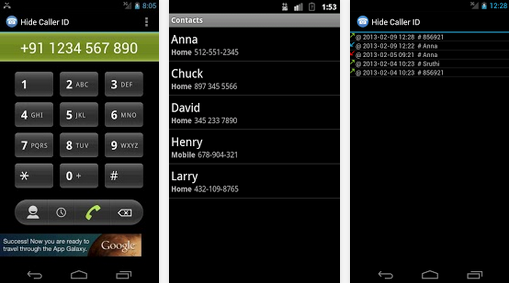
Hide Phone Number Caller ID: This app is freely available on google play. This app basically add a some pre codes to the number you are dialing. Like in my previous tutorial i told you about some codes. Now using this app you don’t have to remember those codes. It will automatically add that to your number.
When you call using this, on called party screen it will display
Private number – Unknown number – Number not available – Withheld number – etc.
But this app does not work for India. Due to some rules and conditions of Indian Government.
Hide My Caller ID Phone Number : Another free app to hide caller id in Android. This app claims that it works for USA, Uk and India. But for me it does not work.
A very cool app that automatically blocks your phone number from appearing on receivers’ phones – it will hide your phone number caller ID. You can let other party see only Private Number.
It supports most mobile operator.
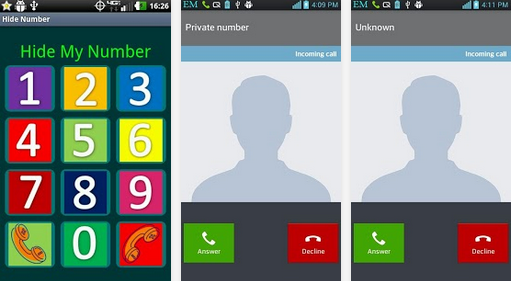
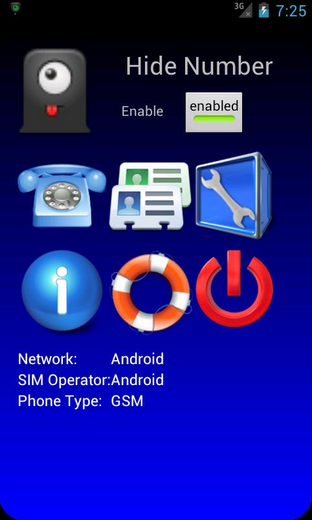
Hide Number (Caller Id): Its a premium app but had great features. It support many operator. You can set whether you want to block your caller id for all number or for some specific number.
But in India, these services does not work. You have to request your service provider for this. Or you can use third party services.
Due toy strict rules of Indian Government, mobile operator does not allow you to call as a private number.
But in other countries like US, Canada these apps work very well.
Smartphones Smartphones everywhere, But no good browser to use. We have wide variety of smartphones now. They are increasing in number day by day. The growth is exponentially increasing. We have hundreds of applications over play store. Most of them are free but the paid ones are also good. We have application for almost everything now say its medical, shopping, ticket booking etc etc. but we cant do everything in apps only.
A good browser is as important as a good smartphones. Where ever we are stuck or in whatever confusion we face with situations we just click on our web browser Google it or whatever is necessary. There are many browsers available over internet and Google play store. There are times when we get stuck between redirects because of apps, mobile sites and link Shortners. I have been facing this problem so many times that sometimes a browser is not good enough too any adds pop up they redirect you to some advertisements and you are annoyed. Well don’t think too much because this one is quick and easy.
Best web browser for Android Tablet
Link Bubble.. it is increasing the numbers of downloads after users come across it and find it working really good. It is really rolling very good on Google play store. It is an awesome floating browser. It looks good and feels good to. Let’s roll over to its feature and installation procedure.
Step to install link bubble browser in Android Tablet
Step 1: go to Google play store option in your phone.
Step 2: Enter the name “link bubble” in the search option provided above in the right most corner. Do prefer search one because searching manually consumes too much of time.
Step 3: lite version one is paid and pro version is freely available. Select the one you wish to use.
Step 4: Install it, accept the provided options and use it.
Time has been changed now we get everything so advanced in a simple manner. They were the days where we faced so many struggle when our battery is remaining dead. We do not know what to do but now there is a solution for this problem because there are so many android battery saver app’s available on google play store. Here i am giving top four best battery saver app’s for android. Even these app’s allow you to download in a simple manner and freely.
You can download these app’s over android mobiles and IOS smartphones. These battery saver app’s are simplest and easiest way to save your battery life. These app’s can keep your mobile working well in a efficiency manner. Even it’s protect when you have low battery. By using these app’s you can extend your battery life. If you do not have any idea about android battery saver app’s then simple follow here i will giving full list of Best battery saver apps for android.
What Does Battery Saver Mode Do?
At the point when Battery Saver is empowered, Android will diminish your gadget’s execution to spare battery control, so it’ll play out somewhat less rapidly yet will remain running longer. Your telephone or tablet won’t vibrate to such an extent. Area administrations will likewise be confined, so applications won’t utilize your gadget’s GPS hardware. This means Google Maps navigation also won’t function. Most background data usage will also be restricted. Email, messaging, and other types of app that rely on receiving new data may not update until you open them.
Battery Saver mode isn’t something you need to empower constantly. While more battery life sounds awesome, killing these elements accompanies huge drawbacks. This mode brings down execution, forestalls foundation match up, and confines GPS get so that’s fine if the alternative is your phone dying, but it’s not something you want to deal with all the time–just when you’re really desperate to eke out a bit more battery.
Best Android Battery Saver Apps 2017
There are so many battery saver apps available in google play store. But we always want to choose best one that’s why here i am giving full information about top 4 best battery saver apps for android 2016. Now you can easily choose best one for your smartphone. So you can manage your battery life in simple way.
1) Greenify
If you have installed more apps on your smartphone or tablet and it become slower and battery hungrier then you must have to try Greenify app to manage your battery life. It is a free energy saver app available for all android and iOS users. It helps you to identify and put the misbehaving apps into hibernate while you are not using that apps.
Greenify enable you to distinguish and put the acting up applications into hibernation when you are not utilizing them, to prevent them from slacking your gadgetand siphoning the battery, interestingly! They can do nothing without unequivocal dispatch by you or different applications, while as yet saving full usefulness when running in frontal area, like iOS applications.
2) Battery Doctor
Battery Doctor is free battery saver apps for android and iOS which allows you to remove background running apps and extend the ba
ttery life. It stops power consumption with single tap on your device. You can easily get the updates of your charging options and status. It provides you to full control of power consumption apps. You can easily find out what is draining your power and easily stop it.
Battery Doctor is a FREE battery saving app. Our special 1-tap optimization feature stops power-consuming apps with a single tap. The feature are Power Shortcut which kills tasks with one tap, Accurate battery remaining time, Accurate charging time remaining, Schedule power saving modes for work/class/sleep and more, Unique 3 Stage Charging System. Wi-Fi/Data/Bluetooth toggles Brightness control. And Battery temperature.
Battery power is another free application to get the battery status on your android or iOS gadget. It has an in-assembled novel innovation to boost your battery life. The best component of this application is to show remaining utilization time while you are utilizing distinctive applications on your smartphone. It additionally has recorded some best tips to expand your battery life while you are voyaging and don’t have any charging point or power reinforcements close you.
Battery Power is an ultimate app, which can help to boost your battery charging speed by 30-40%. APP automatically activate when connect your charger and it will boost your charging speed. How Fast Battery Charger works, you review it through this app. The feature are One-tap battery optimizer, Activity remaining time estimator, App manager for stop/uninstall the user and system apps , per-mode and custom mode for set battery manager, Widget for saving the battery life up to 4x.
4) Avast Battery Saver
Avast is as of now a famous choice for some individuals who need to manage and control different parts of their smartphone and the Avast Battery Saver hopes to give a similar kind of administration to your smartphone’s battery. In a comparable vein to Battery Doctor, this one will give more point by point data about what is expending your battery and help you to direct the activities of those applications and administrations.
The all new Avast Battery Saver 2.0 is less demanding to utilize and more capable than any time in recent memory, enabling you to stop applications with one tap, accelerate your gadget, and spare battery life. Press up to 20% more life from your battery by ceasingapplications that keep running in the background.Don’t let your telephone let you down. Perceive what number of applications you have running out of sight and get standard, precise assessments of how much time you have left on your battery.
Not at all like a portion of alternate applications on this list, Battery optimizer and Cleaner offers various included esteem highlights past simply the battery. So this one will furnish you with choices like cleaning the memory to help enhance speed and furthermore the capacity to screen your
portable information utilization, and additionally, all the battery sparing deceives you would anticipate.
This across the board telephone sponsor application gives you Brisk Lift it enhances and gives a moment synopsis of your smartphone’s execution with a one tap help, BATTERY SAVER enhances your smartphone’s battery life and battery use by killing superfluous exercises, settings, and power-devouring applications, Stockpiling CLEANER arranges for storage room with the Android garbage cleaner by evacuating covered up and pointless records, including brief documents.
6) Battery Magic
Battery Magic is a free Battery saver applications for bot
h android and iOS clients. It has an astonishing battery lift, information and battery investigation include with the goal that you can without much of a stretch get the points of interest of the rest of the battery and remaining time for various applications. It has additionally a paid form called “Battery Enchantment World class” which has some unique and astonishing components to support your battery life.
Battery Power Saver is a FREE battery sparing application that makes your battery last more and can enable you to get up to have more battery life for your Android telephone. The part of this versatile was Spare Power Alternate way which kills errands with one tap, Kill applications when screen is off, Exact battery remaining time, Precise charging time remaining, Calendar control sparing modes for work/class/rest and the sky is the limit from there, One of a kind 3 Phase Charging Framework, Wi-Fi/Information/Bluetooth flips, Splendor control, Battery temperature.
7) Battery Saver
Battery Saver is a just excellent and simple to utilize an application to check the battery status of your Android or iOS gadget. It
is allowed to utilize and gives you exact battery rate see. You can likewise check your Slam use and status utilizing this application. It has a stunning component as movement remaining time estimator which shows the rest of an opportunity to utilize diverse applications introduced on your gadget.
Battery Saver is a FREE battery sparing application. Our extraordinary 1-tap advancement includes stops control expanding applications with a solitary tap. The components accompany Spare Power Alternate way which kills assignments with one tap, Kill applications when screen is off, Exact battery remaining time, Precise charging time remaining, Calendar control sparing modes for work/class/rest and that’s only the tip of the iceberg, Extraordinary 3 Phase Charging Framework, Wi-Fi/Information/Bluetooth flips, Splendor control, Battery temperature.
8) Battery Manager
Battery Manager is another free and easy to understand battery saver applications for Android clients. It has a side menu which enables you to rapidly bounce starting with one screen then onto the next as per your necessity. You can without much of a stretch get the present status of your battery and furthermore get other data including level, temperature, voltage, and others. It is completely adaptable and resizable gadget application with the goal that you can keep the fundamental data on your home screen.
Battery manager gives all of you data about your telephone battery and its status, nitty gritty battery insights, and data, for example, voltage, temperature, limit, etc.Simple Battery Administrator + Gadget encourages you to build battery life and gives you full control of uses and administrations running on your smartphone. All consents required by the application are important to deal with Wifi, 2G, 3g, 4g versatile information, splendor level on your gadget and lift battery life by closing them down when not utilizing, and for impairing applications that deplete the battery.
9) 360 Battery
A large portion of the applications that are intended to enhance battery life take an “observing” approach and 360 Battery is the same. This one hopes to screen what is going on your cell phone and give data back to you so you can better control the levels of battery utilization and utilization. This one additionally comes stacked with other preset modes which you can apply and let the application do all the work – including immediately slaughtering battery-parched applications before they even dispatch out of sight.
Alter your depleting settings and incapacitate superfluous applications that deplete your battery! In a flash find and stop control devouring applications with a solitary tap. The primary element was One tap control saver, Propel control sparing application, Associate awakens control saver, control sparing mode, Battery control estimation and so forth. In addition, 360 battery saver additionally is an application saver, it encourages you to deal with all depleting applications, stop futile applications and abatement the charging time.Free download this battery saver application exhaustively with just a single tap to broaden your gadget’s battery life.
10) ShutApp
This application which adopts a significantly easier strategy to enhancing battery life. As the name recommends, ShutApp is about the closing down of applications as an approach to drag out the battery. So whether this is closing down applications which devour a considerable measure of prompt battery or closing down those which shopper battery over a long stretch (by running out of sight), ShutApp will close those applications down for you.
These are what make ShutApp a phenomenal battery saver.The best battery-sparing application accessible with one tap and rapidly close battery-depleting applications. Shut applications won’t get restart, Auto close down foundation applications on UNrooted phones., Blockinformation stream when the smartphone is not being used and just applications in the dynamic rundown approach the system. (This component requires to introduce Rest, the other application created by us.)Receive warnings and brisk access to close down applications by means of coasting Magic Ball.
11) Snapdragon
Snapdragon is a stunning battery master application for a
ndroid clients which causes you to broaden battery life. It has a clever element which encourages you to deal with your applications running in the foundation of your Android gadget. You can undoubtedly improve your gadget to broaden the battery life of your gadget. It doesn’t require client setup to deal with the battery life or rate.
Snapdragon™ BatteryGuru can broaden battery life by keenly rolling out improvements that assistance streamlines gadget usefulness in cell phones with Snapdragon portable processors. This application: Conveys longer battery existence with fewer charges, Astutely figures out how you utilize your Snapdragon-fueled cell phone and improves your gadget without debilitating cell phone usefulness, Requires no client design – Snapdragon BatteryGuru naturally learns and changes the cell phone settings.
DU Battery Saver is another free battery saving application for android and iOS which enables you to build the battery life. It has an astonishing pre-set battery control administration mode which enables you to take care of all battery issues and broaden your battery life. Extraordinary compared to another element of this application is its chill off component which works by deliberately observing to cripple unusable applications to ensure your hardware.
DU Battery Saver and Battery Screen and Battery Life and Solid Battery Charge is the most straightforward and least demanding approach to keep your Android telephone functioning admirably when you require it, and secure against poor charging, battery hoarding applications, and disregarded gadget settings that abbreviate your battery life. The elements of this application Power Set aside To 60% and Broaden Battery Life, One-Tap Battery Saver and Battery Streamlining agent and Battery Saver, Telephone Cooler, Garbage Cleaner, Battery Saver and Battery Screen, Healthy Battery Charge And so on.
It is a flawless battery screen application for android and iOS clients with rich outline and simple to utilize. You can without much of a stretch know how long you have left to use diverse applications introduced in your gadget. You can without much of a stretch get the alarms for various applications in various ways. A standout amongst other component of this application is to alarm you when the battery is completely charged showing the right esteems for your gadget.
This is the ideal battery screen for your telephone or tablet. It is basic, delightful and can be adjusted uniquely for your device.Instantly know how long you have left to listen: to music, Watching video, Chatting on the telephone, Web Perusing ( WiFi/Edge/3G/4G ), Standby, Time left to energize, Time to utilize Drove Electric lamp, 2D and 3D Recreations, Perusing books, GPS route, Video visit, Taking photographs, Recording recordings And so on.
14) Go Battery Saver & Power Widget
Another prevalent choice is GO Battery Saver and this one additionally accompanies various components particularly intended to enhance your battery’s life once a day, including a helpful gadget which offers simple to see data on the execution of your battery. This one will likewise hope to give you evaluated battery life funds on different angles, as for example, how much your battery could be stretched out by closing down Bluetooth when it is not being utilized.
Battery Saver is equipped for broadening your battery life. Fundamental components of this battery in addition to incorporate power saving mode, shrewd sparing, flip control, control testing, and so on. Never stress over finding a charger amidst the day again.Main Components of this application precisely appraises battery remaining time, Gadget that enhances battery execution with customized UI configuration, Shows how much battery power will be broadened on the off chance that you close down WiFi, Bluetooth, and so on, Battery utilization streamlining in only a single tick, smart battery save.
15) Repair Battery Life Pro
It is a free battery repair application for android users by Aracely which improve the season of your battery. You can without much of a stretch utilize this a single tick application to augment the battery life of your android gadget. It is light weight and simple to introduce application you can without much of a stretch utilize this application to enhance your battery time substantially more. It has empowered temperature Repair Battery Life is a free and expert application to upgrade the season of your battery, it is a “Single tick application”, natural, quick and simple.
Utilize Battery Repair Life and disregard energizing your telephone each day.Features: On Snap Application framework, Enhance your battery time utilizing it just once per week,24/7 Support, Temperature marker, voltage pointer, Innovation Pointer and significantly more.Marker, innovation pointer, voltage marker and others.
The above battery saver applications offer something for everybody, so even the less technically knowledgeable ought to have the capacity to discover an application that will suit their requirements. It has been hard to limit the tremendous measure of battery saving applications down to only 10, yet the greater part of the above offer a strong execution and a wide selection of components. Best of all maybe, is that they are for the most part allowed to download. In the event that you know whatever other battery saver applications for Android that you consider deserving of being among the best.




![Screenshot_2015-01-21-15-08-57[1]](https://technofizi.net/wp-content/uploads/2015/01/Screenshot_2015-01-21-15-08-571.png)
![Screenshot_2015-01-21-15-10-31[1]](https://technofizi.net/wp-content/uploads/2015/01/Screenshot_2015-01-21-15-10-311.png)