Tuesday, 27 September 2016

CORE JAVA LAB@HOME 5 ~ GNIITHELP

Question-1 Calculate Area of triangle.

Answer:-

abstract class GameConsole  {


   int score;

    void displayScore ()   {

   System.out.println("The displayScore method.");

  }


  abstract void computeScore();

  abstract void playGame();

 }


 class Badminton extends GameConsole   {


  void playGame()   {

   System.out.println("Starting the Badmintion Game...");

  }


  void computeScore()  {

   System.out.println("Calculating Score for the Badmintion Game...");

  }

 }

  class TableTennis extends GameConsole  {


  void playGame()   {

   System.out.println("Starting the TableTennis Game...);

  }

  void computeScore()  {

   System.out.println("Calculating Score for the TableTennis Game...");

  }

 }


 public class GameDemo   {


  public static void main(String args[])   {

   Badminton obj1 = new Badminton ();

   obj1.playGame();

   obj1.computeScore();

   obj1.displayScore();


   TableTennis obj2 = new TableTennis();

   obj2.playGame();

   obj2.computeScore();

   obj2.displayScore();

  }

 }


Question-2 Compass Direction.

Answer:-

public class OuterClass {


public int x = 42;


public void method1() {


        class LocalClass {


            public void localPrint() {


                System.out.println("In local class");


                System.out.println(x);


            }


       }


        LocalClass lc = new LocalClass();


        lc.localPrint();

    }


    public void method2() {


        Runnable r = new Runnable() {


            @Override

            public void run() {


                System.out.println("In an anonymous local class method");


                System.out.println(x);


            }


        };


        r.run();

    }

    public Runnable r = new Runnable() {


        @Override


        public void run() {


            System.out.println("In an anonymous class method");


            System.out.println(x);


        }


    };


Question-3 Query on furniture Items.

Answer:-

public adstract class Furniture {


  protected String color;

  protected int width;

  protected int height;

  public adstract void accept();

  public adstract void display();

 }

     class chair extends Furniture {

  private int numOf_legs;


  public void accept() {


  colour = "Brown"

  width = 36;

  height = 48;

  numOf_legs = 4;

 }

    public void display()    {

  System.out.println("DISPLAYING VALUE FOR CHAIR");

  system.out.println

 ("==================================");

  System.out.println("Color is" + color);

  System.out.println("Width is" + width);

  System.out.println("Height is" + height);

  System.out.println("Number of legs is" + numOf_legs);

  System.out.println(" ");

  }

 }


 class Bookshelf extends Furniture {


  private int numOf_shelves;


  public void accept()  {


   colour ="Black";

   width = 72;

   height = 84;

   numOf_shelves = 4;

  }

  public void display ()  {

   System.out.println("DISPLAYING VALUES FOR BOOKSHELF")

   System.out.println

  ("===================================");


  System.out.println("Color is" + color);

  System.out.println("Width is" + width);

  System.out.println("Height is" + height);

  System.out.println("Number of shelves is" + numOf_shelves);

  System.out.println(" ");

  }

 }


 class FurnitureDemo  {

  public static void main(String[] args)   {

   bookShelf b1 = new BookShelf();

   b1.accept();

   b1.display();


   Chair c1 = new Chair ();

   c1.accept();

   c1.display();


  }

Question-4 Query on Game Console.

Answer:-

abstract class Area  {

  double dim1, dim2, result;


  abstract void calArea();


  double disArea()    {


   return result;

  }

 }

     class Circle extends Area   {

  double pie = 3.14;


  public Circle(double rad)   {

   dim1 = rad;


  }


  void calArea()  {

   result= pie*dim1*dim1;

  }

 }


    class Rectangle extends Area   {

  public Rectangle(double ln, double br)   {

   dim1 = ln;

   dim2 = br;

  }


  void calArea()   {

   result = dim1 * dim2;

  }

 }


   claSS Square extand Area   {

  public Square(double side)   {

   dim1 = side;

  }


  void calArea()   {

   result =dim1* dim1;

  }

 }


   class Triangle extends Area  {

   public Triangle (double bas, double high)   {

    dim1 = bas;

    dim2 = high;

   }


   void calArea() {

    result = (dim1 * dim2 ) /2;


   }

 }

    public class Area calculator   {

  public static void main (String[] args)  {

   Square sobj = new Square (44.5);

   sobj.calArea();

   System.out.println("The area of square is " + sobj.disArea());


   Rectangle robj = new Rectangle (23.4, 12);

   robj.calArea();

   System.out.println("The area of rectangle is " + robj.disArea());


   Circle cobj = new Circle (5.7);

   cobj.calArea();

   System.out.println("The area of circle is " + cobj.disArea());


   Triangle tobj = new Triangle (20, 20);

   tobj.calArea();

   System.out.println("The area of triangle is " + tobj.disArea());

  }


Question-5 Create a Nested Class.

.Write a program to calculate the area of triangle, circle, square, and rectangle. However, you need to ensure that the preceding set of functionalities must be achieved by implementing abstraction.

Answer:-

Ans.abstract class GameConsole  {


   int score;

    void displayScore ()   {

   System.out.println("The displayScore method.");

  }


  abstract void computeScore();

  abstract void playGame();

 }


 class Badminton extends GameConsole   {


  void playGame()   {

   System.out.println("Starting the Badmintion Game...");

  }


  void computeScore()  {

   System.out.println("Calculating Score for the Badmintion Game...");

  }

 }

  class TableTennis extends GameConsole  {


  void playGame()   {

   System.out.println("Starting the TableTennis Game...);

  }

  void computeScore()  {

   System.out.println("Calculating Score for the TableTennis Game...");

  }

 }


 public class GameDemo   {


  public static void main(String args[])   {

   Badminton obj1 = new Badminton ();

   obj1.playGame();

   obj1.computeScore();

   obj1.displayScore();


   TableTennis obj2 = new TableTennis();

   obj2.playGame();

   obj2.computeScore();

   obj2.displayScore();

  }

 }

Read More »

CORE JAVA LAB@HOME 6 ~ GNIITHELP

Question-1 Create Interface write all step that would be followed.

Answer:-

1 open the petcomposition project as the main project.

 a select file > open project.

 b browse t d:\labs\06-interfaces\practices.

 c select petcomposition and select the "open as main project chek box.

 d click the open project button.


2 expand the project diretories.


3 run the project. you should see output in the output window.


4 centralize all <name> functionality.

  a create a nameable interface (under the com.example package).

  b complete the nameable interface with setname and getname method signatures.

         public interface nameable {


         public void setname(string name);


        public string getname();

   }


c create a nameable class (under the com.example package).


Question-2 Create a object for a class.

Answer:-

public class ObjectCOunter

{

public static int counter;

public objectcounter()

{

counter++;

}

}


class Testcounter

{

public static void main(String [] args)

{

OjectCounter obj=new ObjectCounter();

System.out.println("Total Numer of objects:"ObjectCounter.counter);

ObjectCounter obj1=new objectCounter();

ObjectCounter obj2=new ObjectCounter();

System.out.println("Total Number of objects:"ObjectCounter.Counter);

}

}

Read More »

CORE JAVA LAB@HOME 7 ~ GNIITHELP

Question-1 Deque Object.

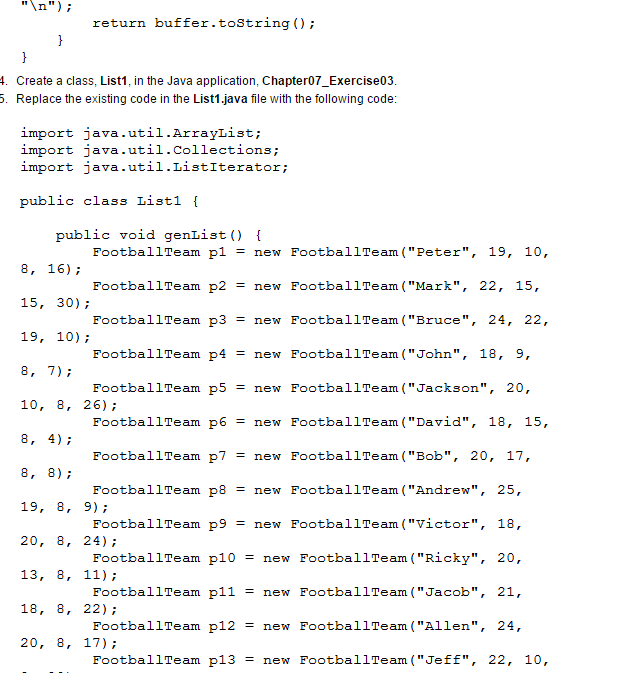
Answer:-   The following answer are in the Image format.


Question-2 Kiwi Request and Response 

Answer:-

import java.until.ArrayDequr;


 public class Request  {


  ArrayDeque<String> pool;


  public Request()   {

       pool = new ArrayDeque<String>();

  }


  public void initRequest(String i, String p)   {

   String ID = i;

   String prb = p;


   String rqt = "Empliyee ID: " + ID +"\nProblem: " + prb;

   pool.add(rqt);


  }


  public void dispRequest()   {

   System.out.println

 ("================================================================");

  System.out.println("-----------------------REQUEST POOL-------\n");


  if (pool.isEmpty () == true) {

           System.out.println ("Currently, there is no request in the pool.");

        }

           else

        {

             for (String s : pool) {

             System.out.println (s);

             System.out.println

      ("--------------------------------------------");

    }

 }


}

      public void attdRequest () {

       String status;


     if (pool . isEmpty () == true) {

         System.out.println

   ("=====================================================");

     System.out.println ("Currently, there is no request in the pool.");

      } else {

           System.out.println

   ("=====================================================");

      System.out.println ("You need to resolve yhr following problem:");

        System.out.print(pool . getFirst () );


        status = "R";


      if (status . toUpperCase () . equals ("R") ) {

           System.out.println

    ("======================================================");

       System.out.println ("The problem has been resolved:");

         System.out.println (pool . getFirst () );

          pool . remove ();

     } else if (status . toUpperCase () . equals ("P") ) {

         System.out.println

   ("\n=======================================================");

         System.out.println ("Please resolve the problem ASAP .");

           } else {

              status = "N";

        }

    }

}


     public static void main (String [] args) {

        Request rq = new Request ();

        rq . initRequest ("3423", "System is not working");

        rq . initReuest (" 3764", "Internet is not working");

        rq . dispRequest ();

        rq . attdRequest ();

    }

}    


Question-3 Add a student Details.

Answer:-


Public class Student implements Comparable  {


  private String name;

  private int marks;


  public Student (String nm, int mk)  {

   this.name = nm;

   this.marks = mk;

  }


  public int getMarks()   {

   return marks;

  }


  public void getName()  {

   return name;

  }


  public void setName(String name)  {

   this.name = name;

  }


  public int compareTo (Object obj)  {

   Student s = (Student) obj;


   if (this.marks > s.getMarks())  {

        return 1;

   } else if (this.marks < s.getMarks())  {

        return -1;

   } Else {

        return 0;

   }

  }

  public String toString()  {

   StringBuffer buffer = new StringBuffer();

   buffer.append("Name: " + name + "\n");

   buffer.append("Marks: " + marks + "\n");

   return buffer.toString();

  }

 }


 import Java.until.Comparator;

 public class NameCompare implements Conparator{

  public int compare(Object a, Object b)

  {

   Student x = (Student) a;

   Student yx = (Student) b;

   return x.getName() .compareTo(y.getName());

  }

 }


  import java.until.ArrayList;

  import java.until.Collections;

  import java.until.ListIterator;


  public class Sorting  {


   public static void main (String[]  args)  {

    Student s1 = new Student("Joe",88);

    Student s2 = new Student("Bob",90);

    Student s1 = new Student("Alex",78);


    ArrayList<Student> obj = new ArrayList<>();

    obj.add(s1);

    obj.add(s2);

    obj.add(s3);


    System.out.println("Student details are:");


    ListIterator li = obj.listIterator();

    while (li.hasNext())   {

       System.out.println(li.next());

    }


    collection.sort(obj);


    System,out.println("Mark wise sort:");


    ListIterator li2 = obj.listIterator();

    while (li2.hasNext())

       System.out.println(li2.next());

    }

    Collection.sort(obj, new NameCompare());


    System.out.println("Name wise sort:");


    ListIterator li3 = obj.listIterator();

    while (li3.hasNext())  {

       System.out.println(li3.next());

   }

  }

 }

Read More »