Tuesday, 21 June 2016

How to convert java.util.Date to java.sql.Timestamp in Java - JDBC Example

You can convert java.util.Date tojava.sql.Timestamp by first taking the long millisecond value using the getTime() method ofDate class and then pass that value to the constructor of Timestamp object. Yes, it's as simple as that. For better code reusability and maintenance, you can create a DateUtils or MappingUtilsclass to keep these kinds of utility or mapping functions. Now, the questions comes, why do you need to convert java.util.Date to java.sql.Timestamp? Well, If you are storing date values to database using JDBC, you need to convert a java.util.Date to its equivalent java.sql.Timestamp value. Even though both of them represent date + time value and can be stored in DATETIME SQL type in Microsoft SQl Server database or equivalent in other databases like Oracle or MySQL, there is no method in JDBC API which takes thejava.util.Date object. Instead, you have got three separate methods to set DATE, TIME, and TIMESTAMP in the java.sql package.


Anyway, It's easy to convert a java.util.Date object to java.sql.Timestamp in Java, all you need to do is call the getTime() method to get the long value from 
java.util.Date object and pass it tojava.sql.Timestamp constructor, as shown below:

public Timestamp getTimestamp(java.util.Date date){
  return date == null ? null : new java.sql.Timestamp(date.getTime());
}

Here I am using the ternary operator of Java to first check if the date is null, if yes then I am returning
null, but if it's not null then I am getting the long millisecond value by calling date.getTime() and constructing a Timestamp object. Remember, similar to Hashtable, Timestamp also doesn't use camel case, it's Timestamp and not TimeStamp.


Using ternary operator is also a nice trick to prevent null pointer exception in Java code, without losing readability or adding more lines of code.


Worth noting, Timestamp is a subclass of java.util.Date but you cannot pass a Timestamp instance where a 
java.util.Date is expected because Timestamp class violates Liskov Substitution Principle. According to which subclass doesn't honor the superclass contract. You can read Clean Code by Uncle Bob Martin to learn more about Liskov Substitution principle and other object-oriented design principles.


Java Program to convert Date to Timestamp in JDBC
Now, let's see the Java program to show how you can convert a Date value to Timestamp value for storing into the database using JDBC API. Remember, if you happen to use both java.sql.Date and java.util.Date on same class then uses full name i.e. with the package to avoid ambiguity e.g. java.sql.Date

import java.sql.Timestamp;
import java.util.Date;

/**
 * Java Program to convert java.util.Date to java.sql.Timestamp
 *
 * @author WINDOWS 8
 */
public class DateToTimeStamp {

    public static void main(String args[]) {

        Date today = new Date();

        // converting date to Timestamp in JDBC
        Timestamp timestamp = new Timestamp(today.getTime());
        Timestamp t2 = getTimestamp(today);

        System.out.println("date: " + today);
        System.out.println("timestamp: " + timestamp);
        System.out.println("timestamp2: " + t2);

    }

    /**
     * Utility method to convert Date to Timestamp in Java
     * @param date
     * @return Timestamp
     */
    public static Timestamp getTimestamp(Date date) {
        return date == null ? null : newjava.sql.Timestamp(date.getTime());
    }

}

Output
date: Sat Mar 12 10:53:26 GMT+08:00 2016
timestamp: 2016-03-12 10:53:26.996
timestamp2: 2016-03-12 10:53:26.996


That's all about how to convert java.util.Date to java.sql.Timestamp in Java. You need this conversion while storing Date values e.g. date of birth, maturity date etc into database table where column type is DATETIME. Just remember that similar to Hashtable, Timestamp also doesn't use capital case and if you happen to use both Date classes from java.sql and java.util package in the same class then use full name e.g. 
java.util.Date for util date and java.sql.Date for SQL Date.
Read More »

java.lang.IllegalStateException: getOutputStream() has already been called for this response

This error comes when you call include() or forward() method after calling  the getOutputStream() from ServletResponse object and writing into it.  This error is similar to java.lang.IllegalStateException: getWriter() has already been called for this response error, which we have seen in the earlier article.

This is the exception:
org.apache.jasper.JasperException: java.lang.IllegalStateException: getOutputStream() has already been called for this response
org.apache.jasper.servlet.JspServletWrapper.handleJspException(JspServletWrapper.java:502)
org.apache.jasper.servlet.JspServletWrapper.service(JspServletWrapper.java:424)
org.apache.jasper.servlet.JspServlet.serviceJspFile(JspServlet.java:313)
org.apache.jasper.servlet.JspServlet.service(JspServlet.java:260)
javax.servlet.http.HttpServlet.service(HttpServlet.java:723)
HelloServlet.doGet(HelloServlet.java:25)
javax.servlet.http.HttpServlet.service(HttpServlet.java:617)
javax.servlet.http.HttpServlet.service(HttpServlet.java:723)

and here is the root cause :


java.lang.IllegalStateException: getOutputStream() has already been called for this response
org.apache.catalina.connector.Response.getWriter(Response.java:611)
org.apache.catalina.connector.ResponseFacade.getWriter(ResponseFacade.java:198)
javax.servlet.ServletResponseWrapper.getWriter(ServletResponseWrapper.java:112)
org.apache.jasper.runtime.JspWriterImpl.initOut(JspWriterImpl.java:125)
org.apache.jasper.runtime.JspWriterImpl.flushBuffer(JspWriterImpl.java:118)
org.apache.jasper.runtime.PageContextImpl.release(PageContextImpl.java:180)
org.apache.jasper.runtime.JspFactoryImpl.internalReleasePageContext(JspFactoryImpl.java:118)
org.apache.jasper.runtime.JspFactoryImpl.releasePageContext(JspFactoryImpl.java:77)
org.apache.jsp.hello_jsp._jspService(hello_jsp.java:80)
org.apache.jasper.runtime.HttpJspBase.service(HttpJspBase.java:70)
javax.servlet.http.HttpServlet.service(HttpServlet.java:723)
org.apache.jasper.servlet.JspServletWrapper.service(JspServletWrapper.java:388)
org.apache.jasper.servlet.JspServlet.serviceJspFile(JspServlet.java:313)
org.apache.jasper.servlet.JspServlet.service(JspServlet.java:260)
javax.servlet.http.HttpServlet.service(HttpServlet.java:723)
HelloServlet.doGet(HelloServlet.java:25)
javax.servlet.http.HttpServlet.service(HttpServlet.java:617)
javax.servlet.http.HttpServlet.service(HttpServlet.java:723)


If you look at the stack trace it points to 
HelloServlet class, which is our Servlet, the line 25 of HelloServlet seems to be causing the problem.

You can see that we are calling the 
include() method after calling the getOutputStream() on Servlet object. Just comment out the call to getOutputStream() and everything will be Ok.  To learn more about Servlet and JSP,  read Head First Servlet and JSP, one of the best books from last 10 years for learning JSP and Servlet.


Here is the complete Java Servlet for your testing, you can run this Servlet into Tomcat right from your Eclipse IDE.

import java.io.IOException;

import javax.servlet.ServletException;
import javax.servlet.http.HttpServlet;
import javax.servlet.http.HttpServletRequest;
import javax.servlet.http.HttpServletResponse;

public class HelloServlet extends HttpServlet {

    public void doGet(HttpServletRequest req, HttpServletResponse resp)
            throws ServletExceptionIOException {
        String userAgent = req.getHeader("user-agent");
        String clientBrowser = "Not known!";
        if (userAgent != null) {
            clientBrowser = userAgent;
        }
        req.setAttribute("client.browser", clientBrowser);
        //req.getRequestDispatcher("/hello.jsp").forward(req, resp);

        resp.getOutputStream().println("This is written from Servlet");
        req.getRequestDispatcher("/hello.jsp").include(req, resp);
    }

}

That's all about java.lang.IllegalStateException: getOutputStream() has already been called for this response error in Servlet. You have learned what cause this error and how to fix this. In short, this error comes when you call the
include() or forward() method after committing the response or by calling the getOutputStream() on the response object. 
Read More »

Best Book to Learn Java Programming for Beginners?

There is no doubt that the best book to learn Java for beginners is indeed Head First Java, 2nd Edition. It's interesting, informative and yet easy to read, which is what a beginner wants. The only drawback of this book is that there is no 3rd Edition available. Java has moved a long way since 2nd edition of this book was released. Yes, the core of the Java programming language is not changed much and information given in this book is still relevant and sufficient for anyone who wants to learn Java programming, but an up to date book comprising changes introduced in Java 7 and Java 8 would have been much appreciated. I was hoping for Head First Java 3rd Edition when Java 8 was launched last year, but no update yet. The changes introduced in Java 8 does demand a new edition of the book, but that is for advanced level. 
For a beginner, it's important to learn basics of Java before diving into lambda expression and other stuff. Head first Java will give you a head start in Java programming by first explaining What is Java, What is Java's competitive advantage over another popular programming language e.g. C, C++ or Python and What is the best way to learn Java. Once you start reading this book, you will learn very quickly.
Best Book to Learn @Java for Beginners? http://t.co/TG4xls3VPw #Java #Programming #book
— javinpaul (@javinpaul) May 30, 2015


Why is Head First Java the best book to learn Java Programming?
Somebody will definitely ask, why I consider Head First Java as the best book? Did I read this book before recommending? Did I have read any other book to say that Head First Java is the best compared to others? Can they trust my words on Head First Java? Well, Yes I have read Head First Java, not once but twice and thrice. I do read it even now after having 9 years of working experience in Java when I want to refresh some concept. I consider Head First Java, 2nd edition best because of following reasons:
The Head First style of teaching which is full of diagrams, images, and characters.
If you know a picture is worth thousand words, to give you an example from Head First Java book, you might know that abstract methods are methods without body, they have just declaration and how they explain it by just showing a human head without body :)
The content of the book is really great and easy to digest. As a beginner, you would hate reading boring subjective content which is bookish and not in conversational style. Head First Java is not a book, its a teacher with full of conversation.
Head First Java is best because it contains lots of quizzes, fill in the blanks, matching exercise, which forces your mind to work. This helps to retain the knowledge you have acquired by reading book.
Head First Java is full of good examples, which is very important from a beginners point of view. Remember you will not learn by just reading the book, you will learn only if you do examples and exercises given in the book.
Authors, Bert Bates, and Kathy Sierra are respectable and are an authority in the field of Java programming language. They have also authored several other books including SCJP guides which are some of the most recommended books for Java developer looking to get certified. 


Best book to learn Java Programming

Any other Good Book to Learn Java?
I am sure these reasons are enough to explain why I think Head First Java is the best book for beginners or anyone who wants to learn Java. On a similar note, since everyone has different taste and some may not like comic book style of Head First Java and look for a traditional style of Java programming book to learn, they can try Core Java, Volume 1 and 2 by Cay S. Horstmann. That book is also a gem and gives comprehensive knowledge of Java programming in an easy way. An author is very renowned and I love his writing style, you won't feel bored while reading his book.


Best book to learn Java
No matter which book you choose to learn Java programming, you should write Java programs, use an IDE like Eclipse or Netbeans because busy developers learn faster than those who just read books. 

All the best and don't forget to come back here if you face any problem while learning Java :)


Update 7th February 2016
Cay S. Horstmann, the author of popular Java 8 book, Java SE 8 for Really Impatient and the classic two-volume introduction of Java programming language has come up with another masterpiece to teach core Java, including Java SE 8. The
 Core Java for the Impatient 1st Edition by Cay S. Horstmann is a complete but concise guide to Java SE 8. It covers all important material of Java programming language, but it's presented in small chunks organized for quick access and easy understanding. I am not sure if it can replace Head First Java but at the moment, it certainly look the best and most updated book to learn Java for beginners.

Best book to learn Java programming


P.S.
 If  you are someone who wants to learn from more than one author and looking for a comprehensive guide on the particular topic, then check my post about 9 books Every Java Developer Should Read. You will find books about multi-threading, Java Generics and Collections,  Design Pattern and several other important topics important for Java developers.

Read More »

How to Convert Byte array to String in Java with Example

There are multiple ways to convert a byte array to String in Java but most straight forward way is to use the String constructor which accepts a byte array i.e. new String(byte []) , but key thing to remember is character encoding. Since bytes are binary data but String is character data, its very important to know the original character encoding of the text from which byte array has created. If you use a different character encoding, you will not get the original String back. For example, if you have read that byte array from a file which was encoded in "ISO-8859-1" and you have not provided any character encoding while converting byte array to String using new String() constructor then its not guaranteed that you will get the same text back? Why? because new String() by default uses platform's default encoding (e.g. Linux machine where your JVM is running), which could be different than "ISO-8859-1". If its different you may see some garbage characters or even different characters changing the meaning of text completely and I am not saying this by reading few books, but I have faced this issue in one of my project where we are reading data from database which contains some french characters. In the absent of any specified coding, our platform was defaulted on something which is not able to convert all those special character properly, I don't remember exact encoding. That issue was solved by providing "UTF-8" as character encoding while converting byte array to String. Yes, there is another overloaded constructor in String class which accepts character encoding i.e. new String(byte[], "character encoding").

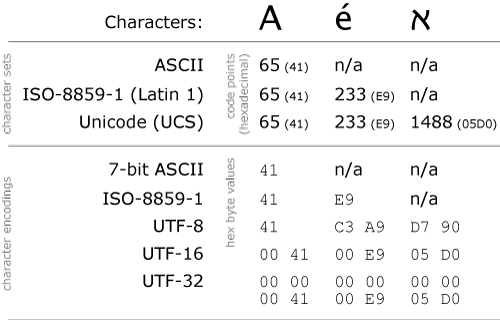
BTW, if you are new in the world of character encoding and don't understand what is UTF-8 or UTF-16, I recommend you to read my article
 difference between UTF-8, UTF-16 and UTF-32 encoding. That will not only explain difference but also give you some basic idea about character encoding. Another article, I recommend you to read is about how Java deals with default character encoding. Since many classes which performs conversion between bytes and character cache character encoding, its important to learn how to provided proper encoding at JVM level. If this interests you then here is the link to full article.


How to convert byte array to String in Java
Everything is 0 and 1 in computers world, yet we are able to see different things e.g. text, images, music files etc. The key to convert byte array to String is character encoding. In simple word, byte values are numeric values and character encoding is map which provide a character for a particular byte for example in most of character encoding scheme e.g. UTF-8, if value of byte is 65, character is A, for 66 it's B. Since ASCII character which includes, numbers, alphabets and some special characters are very popular they have same value in most of encoding scheme. But that's not true for every byte value for example -10 can be different in UTF-8 and Windows-1252 encoding scheme. Now some one can question that, since byte has 8 bits, it can only represent maximum 255 characters, which is quite less given so many languages in the world. That's why we have multi byte character encoding schemes, which can represent a lot many characters. Why we need to convert bytes to String? one real world example is to display base 64 encoded data as text. In order to do that you need to convert byte array to hex String as shown in that tutorial.


Java Byte Array to String Example
Byte array to String in Java with Example
 Now we know little bit of theory about how to convert byte array to String, let's see a working example. In order to make the example simple, I have created a byte array on the program itself and then converted that byte array into String using different character encoding e.g. cp1252, which is default character encoding in Eclipse, windows1252 another popular encoding in Windows and UTF-8, which is a default standard character encoding in world. If you run this program and look at the output you will notice that most of the characters are same in all three encoding, they are mostly ASCII characters containing alphabets in both upper and lower case and numbers, but special characters are rendered differently. This is where using incorrect character encoding can create trouble. Rest of the example is pretty straight forward as we already have a byte array and we are just using overloaded String constructor which also accepts encoding. For a more complex example, where we read content from an XML file, see this tutorial. There are also printable and non-printable characters in ASCII, which is handled differently by different character encoding.


import java.io.UnsupportedEncodingException;

public class ByteArrayToStringDemo {

    public static void main(String args[]) throwsUnsupportedEncodingException {
      
        byte[] random = new byte[] { 6765706966656669-20};
      
        String utf = new String(random, "UTF-8");
        String cp1252 = new String(random, "Cp1252");
        String windows1252 = new String(random, "Windows-1252");
    
        System.out.println("String created from byte array in UTF-8 encoding : " + utf);
        System.out.println("byte array to String in Cp1252 encoding : " +cp1252);
        System.out.println("byte array to String in Windows-1252 encoding : " + windows1252);

    }

}

Output :
String created from byte array in UTF-8 encoding : CAFEBABE?
byte array to String in Cp1252 encoding : CAFEBABEì
byte array to String in Windows-1252 encoding : CAFEBABEì


That's all about
 how to convert byte array to String in Java. Always provide character encoding while converting bytes to character and that should be the same encoding which is used in original text. If you don't know then UTF-8 is good default but don't rely on platform's default character encoding because that is subject to change and might not be UTF-8. Better option is to set character encoding for your application at JVM level to have complete control on how byte array gets converted to String.
Read More »