Saturday, 13 May 2017

java User made Exception Subclass ~ GNIITHELP

User defined Exception subclass

You can also create your own exception sub class simply by extending java Exception class. You can define a constructor for your Exception sub class (not compulsory) and you can override the toString() function to display your customized message on catch.
class MyException extends Exception
{
 private int ex;
 MyException(int a)
 {
  ex=a;
 }
 public String toString()
 {
  return "MyException[" + ex +"] is less than zero";
 }
}

class Test
{
 static void sum(int a,int b) throws MyException
 {
  if(a<0)
  {
   throw new MyException(a);
  }
  else 
  { 
   System.out.println(a+b); 
  }
 }

 public static void main(String[] args)
 {
  try
  {
   sum(-10, 10);
  }
  catch(MyException me)
  {
   System.out.println(me);
  }
 }
}

Points to Remember


  1. Extend the Exception class to create your own ecxeption class.
  2. You don't have to implement anything inside it, no methods are required.
  3. You can have a Constructor if you want.
  4. You can override the toString() function, to display customized message.
Read More »

java throw, throws and finally ~ GNIITHELP

throw keyword is used to throw an exception explicitly. Only object of Throwable class or its sub classes can be thrown. Program execution stops on encountering throw statement, and the closest catch statement is checked for matching type of exception.
Syntax :
throw ThrowableInstance

Creating Instance of Throwable class

There are two possible ways to get an instance of class Throwable,
  1. Using a parameter in catch block.
  2. Creating instance with new operator.
    new NullPointerException("test");
    
    This constructs an instance of NullPointerException with name test.

Example demonstrating throw Keyword

class Test
{
 static void avg() 
 {
  try
  {
   throw new ArithmeticException("demo");
  }
  catch(ArithmeticException e)
  {
   System.out.println("Exception caught");
  } 
 }

 public static void main(String args[])
 {
  avg(); 
 }
}
In the above example the avg() method throw an instance of ArithmeticException, which is successfully handled using the catch statement.

throws Keyword

Any method capable of causing exceptions must list all the exceptions possible during its execution, so that anyone calling that method gets a prior knowledge about which exceptions to handle. A method can do so by using the throws keyword.
Syntax :
type method_name(parameter_list) throws exception_list
{
 //definition of method
}

NOTE : It is necessary for all exceptions, except the exceptions of type Error and RuntimeException, or any of their subclass.

Example demonstrating throws Keyword

class Test
{
 static void check() throws ArithmeticException
 {
  System.out.println("Inside check function");
  throw new ArithmeticException("demo");
 }

 public static void main(String args[])
 {
  try
  {
   check();
  }
  catch(ArithmeticException e)
  {
   System.out.println("caught" + e);
  }
 }
}

finally clause

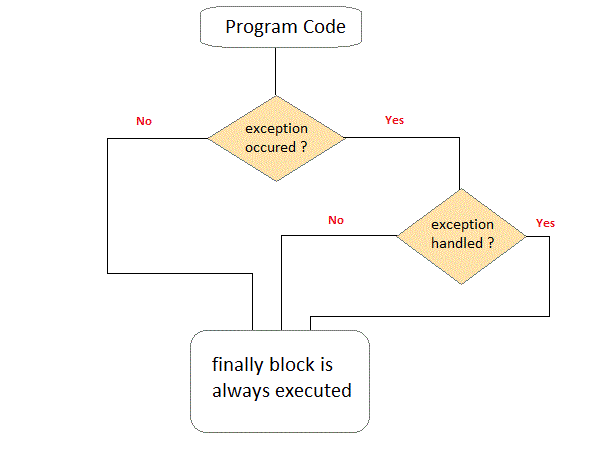
A finally keyword is used to create a block of code that follows a try block. A finally block of code always executes whether or not exception has occurred. Using a finally block, lets you run any cleanup type statements that you want to execute, no matter what happens in the protected code. A finally block appears at the end of catch block.
finally clause in exception handling in java

Example demonstrating finally Clause

Class ExceptionTest
{
 public static void main(String[] args)
 {
  int a[]= new int[2];
  System.out.println("out of try");
  try 
  {
   System.out.println("Access invalid element"+ a[3]);
   /* the above statement will throw ArrayIndexOutOfBoundException */
  }
  finally 
  {
   System.out.println("finally is always executed.");
  }
 }
}
Output :
Out of try
finally is always executed. 
Exception in thread main java. Lang. exception array Index out of bound exception.  
You can see in above example even if exception is thrown by the program, which is not handled by catch block, still finally block will get executed.
Read More »

java try with resource statement ~ GNIITHELP

JDK 7 introduces a new version of try statement known as try-with-resources statement. This feature add another way to exception handling with resources management,it is also referred to as automatic resource management.
Syntax
try(resource-specification)
{
//use the resource
}catch()
{...}
This try statement contains a paranthesis in which one or more resources is declare. Any object that implements java.lang.AutoCloseable or java.io.Closeable, can be passed as a parameter to try statement. A resource is an object that is used in program and must be closed after the program is finished. The try-with-resources statement ensures that each resource is closed at the end of the statement, you do not have to explicitly close the resources.


Example without using try with Resource Statement

import java.io.*;
class Test
{
public static void main(String[] args)
{
try{
String str;
//opening file in read mode using BufferedReader stream
BufferedReader br=new BufferedReader(new FileReader("d:\\myfile.txt"));   
while((str=br.readLine())!=null)
 {
System.out.println(str);
 }      
br.close(); //closing BufferedReader stream
}catch(IOException ie)
{  System.out.println("exception");  }
 }
}

Example using try with Resource Statement

import java.io.*;
class Test
{
public static void main(String[] args)
{
try(BufferedReader br=new BufferedReader(new FileReader("d:\\myfile.txt")))
{
String str;
while((str=br.readLine())!=null)
{
System.out.println(str);
}
}catch(IOException ie)
{  System.out.println("exception");  }
}
}
NOTE: In the above example, we do not need to explicitly call close() method to close BufferedReader stream.
Read More »

java try and catch block ~ GNIITHELP

Exception Handling Mechanism

In java, exception handling is done using five keywords,
  1. try
  2. catch
  3. throw
  4. throws
  5. finally
Exception handling is done by transferring the execution of a program to an appropriate exception handler when exception occurs.

Using try and catch

Try is used to guard a block of code in which exception may occur. This block of code is called guarded region. A catch statement involves declaring the type of exception you are trying to catch. If an exception occurs in guarded code, the catch block that follows the try is checked, if the type of exception that occured is listed in the catch block then the exception is handed over to the catch block which then handles it.


Example using Try and catch

class Excp
{
 public static void main(String args[])
 {
  int a,b,c;
  try
  {
   a=0;
   b=10;
   c=b/a;
   System.out.println("This line will not be executed");
  }
  catch(ArithmeticException e)
  {
   System.out.println("Divided by zero"); 
  }
  System.out.println("After exception is handled");
 }
}
Output :
Divided by zero
After exception is handled
An exception will thrown by this program as we are trying to divide a number by zero inside try block. The program control is transfered outside try block. Thus the line "This line will not be executed" is never parsed by the compiler. The exception thrown is handle in catch block. Once the exception is handled the program controls continue with the next line in the program. Thus the line "After exception is handled" is printed.

Multiple catch blocks:

A try block can be followed by multiple catch blocks. You can have any number of catch blocks after a single try block.If an exception occurs in the guarded code the exception is passed to the first catch block in the list. If the exception type of exception, matches with the first catch block it gets caught, if not the exception is passed down to the next catch block. This continue until the exception is caught or falls through all catches.

Example for Multiple Catch blocks

class Excep
{
 public static void main(String[] args)
 {
  try
  {
   int arr[]={1,2};
   arr[2]=3/0;
  } 
  catch(ArithmeticException ae)
  {
   System.out.println("divide by zero");
  }
  catch(ArrayIndexOutOfBoundsException e)
  {
   System.out.println("array index out of bound exception");
  }
 }
}
Output :
divide by zero

Example for Unreachable Catch block

While using multiple catch statements, it is important to remember that exception sub classes inside catch must come before any of their super classes otherwise it will lead to compile time error.
class Excep
{
 public static void main(String[] args)
 {
  try
  {
   int arr[]={1,2};
   arr[2]=3/0;
  }
  catch(Exception e)    //This block handles all Exception
  {
   System.out.println("Generic exception");
  }
  catch(ArrayIndexOutOfBoundsException e)    //This block is unreachable
  {
   System.out.println("array index out of bound exception");
  }
 }
}

Nested try statement

try statement can be nested inside another block of try. Nested try block is used when a part of a block may cause one error while entire block may cause another error. In case if inner try block does not have a catch handler for a particular exception then the outer try is checked for match.
class Excep
{
 public static void main(String[] args)
 {
  try
  {
   int arr[]={5,0,1,2};
   try
   {
    int x=arr[3]/arr[1];
   }
   catch(ArithmeticException ae)
   {
    System.out.println("divide by zero");
   }
   arr[4]=3;
  }
  catch(ArrayIndexOutOfBoundsException e)
  {
   System.out.println("array index out of bound exception");
  }
 }
}

Important points to Remember

  1. If you do not explicitly use the try catch blocks in your program, java will provide a default exception handler, which will print the exception details on the terminal, whenever exception occurs.
  2. Super class Throwable overrides toString() function, to display error message in form of string.
  3. While using multiple catch block, always make sure that exception subclasses comes before any of their super classes. Else you will get compile time error.
  4. In nested try catch, the inner try block, uses its own catch block as well as catch block of the outer try, if required.
  5. Only the object of Throwable class or its subclasses can be thrown.
Read More »

java Exception Handling ~ GNIITHELP

Exception Handling is the mechanism to handle runtime malfunctions. We need to handle such exceptions to prevent abrupt termination of program. The term exception means exceptional condition, it is a problem that may arise during the execution of program. A bunch of things can lead to exceptions, including programmer error, hardware failures, files that need to be opened cannot be found, resource exhaustion etc.

Exception

A Java Exception is an object that describes the exception that occurs in a program. When an exceptional events occurs in java, an exception is said to be thrown. The code that's responsible for doing something about the exception is called an exception handler.


Exception class Hierarchy

All exception types are subclasses of class Throwable, which is at the top of exception class hierarchy.
exception handling in java
  • Exception class is for exceptional conditions that program should catch. This class is extended to create user specific exception classes.
  • RuntimeException is a subclass of Exception. Exceptions under this class are automatically defined for programs.

Exception are categorized into 3 category.

  • Checked Exception
  • The exception that can be predicted by the programmer.Example : File that need to be opened is not found. These type of exceptions must be checked at compile time.
  • Unchecked Exception
  • Unchecked exceptions are the class that extends RuntimeException. Unchecked exception are ignored at compile time. Example : ArithmeticException, NullPointerException, Array Index out of Bound exception. Unchecked exceptions are checked at runtime.
  • Error
  • Errors are typically ignored in code because you can rarely do anything about an error. Example : if stack overflow occurs, an error will arise. This type of error is not possible handle in code.

Uncaught Exceptions

When we don't handle the exceptions, they lead to unexpected program termination. Lets take an example for better understanding.
class UncaughtException
{
 public static void main(String args[])
 {
  int a = 0;
  int b = 7/a;     // Divide by zero, will lead to exception
 }
}
This will lead to an exception at runtime, hence the Java run-time system will construct an exception and then throw it. As we don't have any mechanism for handling exception in the above program, hence the default handler will handle the exception and will print the details of the exception on the terminal.
Uncaught Exception in java
Read More »

java StringBuilder class ~ GNIITHELP

StringBuilder is identical to StringBuffer except for one important difference it is not synchronized, which means it is not thread safe. Its because StringBuilder methods are not synchronised.

StringBuilder Constructors

  1. StringBuilder ( ), creates an empty StringBuilder and reserves room for 16 characters.
  2. StringBuilder ( int size ), create an empty string and takes an integer argument to set capacity of the buffer.
  3. StringBuilder ( String str ), create a StringBuilder object and initialize it with string str.

Difference between StringBuffer and StringBuilder class

StringBuffer classStringBuilder class
StringBuffer is synchronized.StringBuilder is not synchronized.
Because of synchronisation, StringBuffer operation is slower than StringBuilder.StringBuilder operates faster.

Example of StringBuilder

class Test {
 public static void main(String args[])
 {
  StringBuilder str = new StringBuilder("study");
  str.append( "tonight" );
  System.out.println(str);
  str.replace( 6, 13, "today");
  System.out.println(str);
  str.reverse();
  System.out.println(str);
  str.replace( 6, 13, "today");
 }
}
Output :
studytonight 
studyttoday
yadottyduts
Read More »

java StringBuffer class ~ GNIITHELP

StringBuffer class is used to create a mutable string object. It represents growable and writable character sequence. As we know that String objects are immutable, so if we do a lot of changes with String objects, we will end up with a lot of memory leak.
So StringBuffer class is used when we have to make lot of modifications to our string. It is also thread safe i.e multiple threads cannot access it simultaneously. StringBuffer defines 4 constructors. They are,
  1. StringBuffer ( )
  2. StringBuffer ( int size )
  3. StringBuffer ( String str )
  4. StringBuffer ( charSequence [ ]ch )

  • StringBuffer() creates an empty string buffer and reserves room for 16 characters.
  • stringBuffer(int size) creates an empty string and takes an integer argument to set capacity of the buffer.

Example showing difference between String and StringBuffer

class Test {
 public static void main(String args[])
 {
  String str = "study";
  str.concat("tonight");
  System.out.println(str);      // Output: study

  StringBuffer strB = new StringBuffer("study");
  strB.append("tonight");
  System.out.println(strB);    // Output: studytonight
 }
}

Important methods of StringBuffer class

The following methods are some most commonly used methods of StringBuffer class.

append()

This method will concatenate the string representation of any type of data to the end of the invoking StringBuffer object. append() method has several overloaded forms.
StringBuffer append(String str)

StringBuffer append(int n)

StringBuffer append(Object obj)
The string representation of each parameter is appended to StringBuffer object.
StringBuffer str = new StringBuffer("test");
str.append(123);
System.out.println(str);
Output : test123

insert()

This method inserts one string into another. Here are few forms of insert() method.
StringBuffer insert(int index, String str)

StringBuffer insert(int index, int num)

StringBuffer insert(int index, Object obj)
Here the first parameter gives the index at which position the string will be inserted and string representation of second parameter is inserted into StringBuffer object.
StringBuffer str = new StringBuffer("test");
str.insert(4, 123);
System.out.println(str);
Output : test123

reverse()

This method reverses the characters within a StringBuffer object.
StringBuffer str = new StringBuffer("Hello");
str.reverse();
System.out.println(str);
Output : olleH

replace()

This method replaces the string from specified start index to the end index.
StringBuffer str = new StringBuffer("Hello World");
str.replace( 6, 11, "java");
System.out.println(str);
Output : Hello java

capacity()

This method returns the current capacity of StringBuffer object.
StringBuffer str = new StringBuffer();
System.out.println( str.capacity() );
Output : 16

ensureCapacity()

This method is used to ensure minimum capacity of StringBuffer object.
StringBuffer str = new StringBuffer("hello");
str.ensureCapacity(10);
Read More »