Saturday, 13 May 2017

java String class Fucntions ~ GNIITHELP

The following methods are some of the most commonly used methods of String class.

charAt()

charAt() function returns the character located at the specified index.
String str = "studytonight";
System.out.println(str.charAt(2));
Output : u

equalsIgnoreCase()

equalsIgnoreCase() determines the equality of two Strings, ignoring thier case (upper or lower case doesn't matters with this fuction ).
String str = "java";
System.out.println(str.equalsIgnoreCase("JAVA"));
Output : true


length()

length() function returns the number of characters in a String.
String str = "Count me";
System.out.println(str.length());
Output : 8

replace()

replace() method replaces occurances of character with a specified new character.
String str = "Change me";
System.out.println(str.replace('m','M'));
Output : Change Me

substring()

substring() method returns a part of the string. substring() method has two forms,
public String substring(int begin);

public String substring(int begin, int end); 
The first argument represents the starting point of the subtring. If the substring() method is called with only one argument, the subtring returned, will contain characters from specified starting point to the end of original string.
But, if the call to substring() method has two arguments, the second argument specify the end point of substring.
String str = "0123456789";
System.out.println(str.substring(4));
Output : 456789
System.out.println(str.substring(4,7));
Output : 456

toLowerCase()

toLowerCase() method returns string with all uppercase characters converted to lowercase.
String str = "ABCDEF";
System.out.println(str.toLowerCase());
Output : abcdef

valueOf()

Overloaded version of valueOf() method is present in String class for all primitive data types and for type Object.
NOTE : valueOf() function is used to convert primitive data types into Strings.
But for objects, valueOf() method calls toString() function.

toString()

toString() method returns the string representation of the object used to invoke this method. toString() is used to represent any Java Object into a meaningful string representation. It is declared in the Object class, hence can be overrided by any java class. (Object class is super class of all java classes.)
public class Car {
 public static void main(String args[])
 {
  Car c=new Car();  
  System.out.println(c);
 }
 public String toString()
 {
  return "This is my car object";
 }
}
Output : This is my car object
Whenever we will try to print any object of class Car, its toString() function will be called. toString() can also be used with normal string objects.
String str = "Hello World";
System.out.println(str.toString());
Output : Hello World

toString() with Concatenation

Whenever we concatenate any other primitive data type, or object of other classes with a String object, toString() function or valueOf() function is called automatically to change the other object or primitive type into string, for successful concatenation.
int age = 10;
String str = "He is" + age + "years old.";
In above case 10 will be automatically converted into string for concatenation using valueOf() function.

toUpperCase()

This method returns string with all lowercase character changed to uppercase.
String str = "abcdef";
System.out.println(str.toUpperCase());
Output : ABCDEF

trim()

This method returns a string from which any leading and trailing whitespaces has been removed.
String str = "   hello  ";
System.out.println(str.trim());
Output : hello

Read More »

java Introduction to String ~ GNIITHELP

String is probably the most commonly used class in java library. String class is encapsulated under java.langpackage. In java, every string that you create is actually an object of type String. One important thing to notice about string object is that string objects are immutable that means once a string object is created it cannot be altered.

What is an Immutable object?

An object whose state cannot be changed after it is created is known as an Immutable object. String, Integer, Byte, Short, Float, Double and all other wrapper class's objects are immutable.


Creating an Immutable class

public final class MyString
{
 final String str;
 MyString(String s)
 {
  this.str = s;
 }
 public String get()
 {
  return str;
 }
}
In this example MyString is an immutable class. MyString's state cannot be changed once it is created.

Creating a String object

String can be created in number of ways, here are a few ways of creating string object.

1) Using a String literal

String literal is a simple string enclosed in double quotes " ". A string literal is treated as a String object.
String str1 = "Hello";

2) Using another String object

String str2 = new String(str1);

3) Using new Keyword

String str3 = new String("Java");

4) Using + operator (Concatenation)

String str4 = str1 + str2;
or,
String str5 = "hello"+"Java";

Each time you create a String literal, the JVM checks the string pool first. If the string literal already exists in the pool, a reference to the pool instance is returned. If string does not exist in the pool, a new string object is created, and is placed in the pool. String objects are stored in a special memory area known as string constant pool inside the heap memory.

String object and How they are stored

When we create a new string object using string literal, that string literal is added to the string pool, if it is not present there already.
String str= "Hello";
Creating String in heap

And, when we create another object with same string, then a reference of the string literal already present in string pool is returned.
String str2=str;
Creating String in heap

But if we change the new string, its reference gets modified.
str2=str2.concat("world");
Creating String in heap

Concatenating String

There are 2 methods to concatenate two or more string.
  1. Using concat() method
  2. Using + operator

1) Using concat() method

string s = "Hello";
string str = "Java";
string str2 = s.concat(str);
String str1 = "Hello".concat("Java");    //works with string literals too.

2) Using + operator

string str = "Rahul"; 
string str1 = "Dravid";
string str2 = str + str1;
string st = "Rahul"+"Dravid";

String Comparison

String comparison can be done in 3 ways.
  1. Using equals() method
  2. Using == operator
  3. By CompareTo() method

Using equals() method

equals() method compares two strings for equality. Its general syntax is,
boolean equals (Object str)
It compares the content of the strings. It will return true if string matches, else returns false.
String s = "Hell";
String s1 = "Hello";
String s2 = "Hello";
s1.equals(s2);    //true
s.equals(s1) ;   //false

Using == operator

== operator compares two object references to check whether they refer to same instance. This also, will return true on successful match.
String s1 = "Java";
String s2 = "Java";
String s3 = new string ("Java");
test(Sl == s2)     //true
test(s1 == s3)      //false

By compareTo() method

compareTo() method compares values and returns an int which tells if the string compared is less than, equal to or greater than th other string. Its general syntax is,
int compareTo(String str)
To use this function you must implement the Comparable Interface. compareTo() is the only function in Comparable Interface.
String s1 = "Abhi";
String s2 = "Viraaj";
String s3 = "Abhi";
s1.compareTo(S2);     //return -1 because s1 < s2 
s1.compareTo(S3);     //return 0 because s1 == s3 
s2.compareTo(s1);     //return 1 because s2 > s1
Read More »

java Nested Classes ~ GNIITHELP

A class within another class is known as Nested class. The scope of the nested is bounded by the scope of its enclosing class.
Nested classes in Java


Static Nested Class

A satic nested class is the one that has static modifier applied. Because it is static it cannot refer to non-static members of its enclosing class directly. Because of this restriction static nested class is seldom used.

Non-static Nested class

Non-static Nested class is most important type of nested class. It is also known as Inner class. It has access to all variables and methods of Outer class and may refer to them directly. But the reverse is not true, that is, Outer class cannot directly access members of Inner class.
One more important thing to notice about an Inner class is that it can be created only within the scope of Outer class. Java compiler generates an error if any code outside Outer class attempts to instantiate Inner class.
Non-static Nested classes in Java

Example of Inner class

class Outer
{
 public void display()
 {
  Inner in=new Inner();
  in.show();
 }

 class Inner
 {
  public void show()
  {
   System.out.println("Inside inner");
  } 
 }
}

class Test
{
 public static void main(String[] args)
 {
  Outer ot=new Outer();
  ot.display();
 }
}
Output :
Inside inner

Example of Inner class inside a method

class Outer
{
 int count;
 public void display()
 {
  for(int i=0;i<5;i++)
  {
   class Inner       //Inner class defined inside for loop
   {        
    public void show()  
    {
     System.out.println("Inside inner "+(count++));
    } 
   }
   Inner in=new Inner();
   in.show();
  }
 }
}

class Test
{
 public static void main(String[] args)
 {
  Outer ot=new Outer();
  ot.display();
 }
}
Output :
Inside inner 0
Inside inner 1
Inside inner 2
Inside inner 3
Inside inner 4

Example of Inner class instantiated outside Outer class

class Outer
{
 int count;
 public void display()
 {
  Inner in=new Inner();
  in.show();
 }

 class Inner
 {
  public void show()
  {
   System.out.println("Inside inner "+(++count));
  } 
 }
}

class Test
{
 public static void main(String[] args)
 {
  Outer ot=new Outer();
  Outer.Inner in= ot.new Inner();
  in.show();
 }
}
Output :
Inside inner 1

Annonymous class

A class without any name is called Annonymous class.
interface Animal
{
 void type();
}
public class ATest {
 public static void main(String args[])
 {
  Animal an = new Animal(){         //Annonymous class created
  public void type()
  {
   System.out.println("Annonymous animal"); 
  }
 };
  an.type();      
 }
}
Output :
Annonymous animal
Here a class is created which implements Animal interace and its name will be decided by the compiler. This annonymous class will provide implementation of type() method.
Read More »

java Interface ~ GNIITHELP

Interface is a pure abstract class.They are syntactically similar to classes, but you cannot create instance of an Interface and their methods are declared without any body. Interface is used to achieve complete abstraction in Java. When you create an interface it defines what a class can do without saying anything about how the class will do it.
Syntax :
interface interface_name { }

Example of Interface

interface Moveable 
{ 
 int AVERAGE-SPEED=40;
 void move();
}
Interface in Java

NOTE : Compiler automatically converts methods of Interface as public and abstract, and the data members as public, static and final by default.

Rules for using Interface

  • Methods inside Interface must not be static, final, native or strictfp.
  • All variables declared inside interface are implicitly public static final variables(constants).
  • All methods declared inside Java Interfaces are implicitly public and abstract, even if you don't use public or abstract keyword.
  • Interface can extend one or more other interface.
  • Interface cannot implement a class.
  • Interface can be nested inside another interface.

Example of Interface implementation

interface Moveable 
{
 int AVG-SPEED = 40;
 void move();
}

class Vehicle implements Moveable 
{
 public void move()
 {
  System .out. print in ("Average speed is"+AVG-SPEED");
 }
 public static void main (String[] arg)
 {
  Vehicle vc = new Vehicle();
  vc.move();
 }
}
Output :
Average speed is 40.

Interfaces supports Multiple Inheritance

Though classes in java doesn't suppost multiple inheritance, but a class can implement more than one interface.
interface Moveable 
{
 boolean isMoveable();
}

interface Rollable
{
 boolean isRollable
}

class Tyre implements Moveable, Rollable 
{
 int width;

 boolean isMoveable()
 {
  return true;
 }

 boolean isRollable()
 {
  return true;
 }
 public static void main(String args[])
 {
  Tyre tr=new Tyre();
  System.out.println(tr.isMoveable());
  System.out.println(tr.isRollable());
 }
}
Output :
true
true

Interface extends other Interface

Classes implements interfaces, but an interface extends other interface.
interface NewsPaper
{
 news();
}

interface Magazine extends NewsPaper
{
 colorful();
}


Difference between an interface and an abstract class?

Abstract classInterface
Abstract class is a class which contain one or more abstract methods, which has to be implemented by its sub classes.Interface is a Java Object containing method declaration but no implementation. The classes which implement the Interfaces must provide the method definition for all the methods.
Abstract class is a Class prefix with an abstract keyword followed by Class definition.Interface is a pure abstract class which starts with interface keyword.
Abstract class can also contain concrete methods.Whereas, Interface contains all abstract methods and final variable declarations.
Abstract classes are useful in a situation that Some general methods should be implemented and specialization behavior should be implemented by child classes.Interfaces are useful in a situation that all properties should be implemented.
Read More »

java Abstract class ~ GNIITHELP

If a class contain any abstract method then the class is declared as abstract class. An abstract class is never instantiated. It is used to provide abstraction. Although it does not provide 100% abstraction because it can also have concrete method.
Syntax :
abstract class class_name { }

Abstract method

Method that are declared without any body within an abstract class are called abstract method. The method body will be defined by its subclass. Abstract method can never be final and static. Any class that extends an abstract class must implement all the abstract methods declared by the super class.
Syntax :

abstract return_type function_name ();    // No definition

Example of Abstract class

abstract class A
{
 abstract void callme(); 
}
class B extends A
{
 void callme()
 {
  System.out.println("this is callme."); 
 }
 public static void main(String[] args)
 {
  B b = new B();
  b.callme();
 }
}
Output :
this is callme.

Abstract class with concrete(normal) method.

Abstract classes can also have normal methods with definitions, along with abstract methods.
abstract class A
{
 abstract void callme();
 public void normal()
 {
  System.out.println("this is concrete method");
 }  
}
class B extends A
{
 void callme()
 {
  System.out.println("this is callme."); 
 }
 public static void main(String[] args)
 {
  B b = new B();
  b.callme();
  b.normal();
 }
}
Output :
 
this is callme.
this is concrete method.

Points to Remember

  1. Abstract classes are not Interfaces. They are different, we will study this when we will study Interfaces.
  2. An abstract class may or may not have an abstract method. But if any class has even a single abstract method, then it must be declared abstract.
  3. Abstract classes can have Constructors, Member variables and Normal methods.
  4. Abstract classes are never instantiated.
  5. When you extend Abstract class with abstract method, you must define the abstract method in the child class, or make the child class abstract.

Abstraction using abstract class

Abstraction is an important feature of OOPS. It means hiding complexity. Abstract class is used to provide abstraction. Although it does not provide 100% abstraction because it can also have concrete method. Lets see how abstract class is used to provide abstraction.
abstract class Vehicle
{
   public abstract void engine();  
}
public class Car extends Vehicle {
    
    public void engine()
    {
        System.out.println("Car engine");   
        //car engine implementation
    }
    
    public static void main(String[] args)
    {
        Vehicle v = new Car();
        v.engine();
    }
}
Output :
Car engine
Here by casting instance of Car type to Vehicle reference, we are hiding the complexity of Car type under Vechicle. Now the Vehicle reference can be used to provide the implementation but it will hide the actual implementation process.

When to use Abstract Methods & Abstract Class?

Abstract methods are usually declared where two or more subclasses are expected to do a similar thing in different ways through different implementations. These subclasses extend the same Abstract class and provide different implementations for the abstract methods.
Abstract classes are used to define generic types of behaviors at the top of an object-oriented programming class hierarchy, and use its subclasses to provide implementation details of the abstract class.
Read More »

java Package ~ GNIITHELP

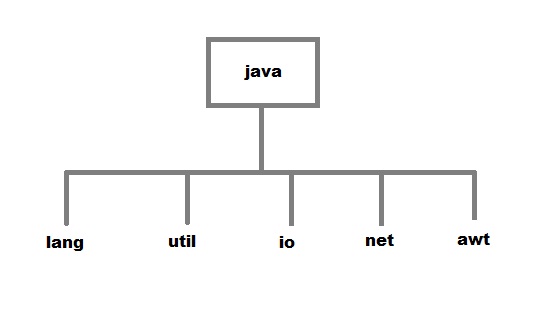
Package are used in Java, in-order to avoid name conflicts and to control access of class, interface and enumeration etc. A package can be defined as a group of similar types of classes, interface, enumeration and sub-package. Using package it becomes easier to locate the related classes.

Package are categorized into two forms

  • Built-in Package:-Existing Java package for example java.lang, java.util etc.
  • User-defined-package:- Java package created by user to categorized classes and interface
Packages in java


Creating a package

Creating a package in java is quite easy. Simply include a package command followed by name of the package as the first statement in java source file.
package mypack;
public class employee 
{
 ...statement; 
}

The above statement create a package called mypack.
Java uses file system directory to store package. For example the .class for any classes you to define to be part of mypack package must be stored in a directory called mypack

Example of package creation

package mypack
class Book
{
 String bookname;
 String author;
 Book(String b, String c)
 {
  this.bookname = b;
  this.author = c;
 }
 public void show()
 {
  System.out.println(bookname+" "+ author);
 }
}

class test
{
 public static void main(String[] args)
 {
  Book bk = new Book("java","Herbert");
  bk.show();
 }
}
To run this program :
  • create a directory under your current working development directory(i.e. JDK directory), name it as mypack.
  • compile the source file
  • Put the class file into the directory you have created.
  • Execute the program from development directory.
NOTE : Development directory is the directory where your JDK is install.

Uses of java package

Package is a way to organize files in java, it is used when a project consists of multiple modules. It also helps resolve naming conflicts. Package's access level also allows you to protect data from being used by the non-authorized classes.

import keyword

import keyword is used to import built-in and user-defined packages into your java source file. So that your class can refer to a class that is in another package by directly using its name.
There are 3 different ways to refer to class that is present in different package
  1. Using fully qualified name (But this is not a good practice.)
    Example :
    class MyDate extends java.util.Date 
    {
     //statement; 
    }
    
  2. import the only class you want to use.
    Example :
    import java.util.Date;
    class MyDate extends Date
    {
     //statement.
    }
    
  3. import all the classes from the particular package
    Example :
    import java.util.*; 
    class MyDate extends Date
    {
    //statement;
    }
    

import statement is kept after the package statement.

Example :
package mypack;
import java.util.*;
But if you are not creating any package then import statement will be the first statement of your java source file.

Static import

static import is a feature that expands the capabilities of import keyword. It is used to import static member of a class. We all know that static member are referred in association with its class name outside the class. Using static import, it is possible to refer to the static member directly without its class name. There are two general form of static import statement.
  • The first form of static import statement, import only a single static member of a class
    Syntax
    import static package.class-name.static-member-name;
    
    Example
    import static java.lang.Math.sqrt;   //importing static method sqrt of Math class
    
  • The second form of static import statement,imports all the static member of a class
    Syntax
    import static package.class-type-name.*;
    
    Example
    import static java.lang.Math.*;   //importing all static member of Math class
    

Example without using static import

public class Test
{
    public static void main(String[] args)
    {
        System.out.println(Math.sqrt(144));
    }
}
Output :
12

Example using static import

import static java.lang.Math.*;
public class Test
{
    public static void main(String[] args)
    {
        System.out.println(sqrt(144));
    }
}
Output :
12
Read More »