Saturday, 13 May 2017

Garbage Collection ~ GNIITHELP

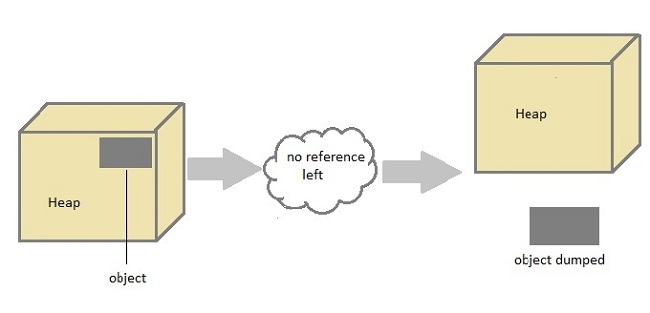
In Java destruction of object from memory is done automatically by the JVM. When there is no reference to an object, then that object is assumed to be no longer needed and the memory occupied by the object are released. This technique is called Garbage Collection. This is accomplished by the JVM.
Unlike C++ there is no explicit need to destroy object.
garbage collection in java

Can the Garbage Collection be forced explicitly ?

No, the Garbage Collection can not be forced explicitly. We may request JVM for garbage collection by calling System.gc() method. But This does not guarantee that JVM will perform the garbage collection.

Advantages of Garbage Collection

  1. Programmer doesn't need to worry about dereferencing an object.
  2. It is done automatically by JVM.
  3. Increases memory efficiency and decreases the chances for memory leak.

finalize() method

Sometime an object will need to perform some specific task before it is destroyed such as closing an open connection or releasing any resources held. To handle such situation finalize() method is used. finalize() method is called by garbage collection thread before collecting object. Its the last chance for any object to perform cleanup utility.
Signature of finalize() method
protected void finalize()
{
 //finalize-code
}

Some Important Points to Remember

  1. finalize() method is defined in java.lang.Object class, therefore it is available to all the classes.
  2. finalize() method is declare as proctected inside Object class.
  3. finalize() method gets called only once by GC threads.

gc() Method

gc() method is used to call garbage collector explicitly. However gc() method does not guarantee that JVM will perform the garbage collection. It only request the JVM for garbage collection. This method is present in System and Runtime class.

Example for gc() method

public class Test
{
    
    public static void main(String[] args)
    {
        Test t = new Test();
        t=null;
        System.gc();
    }
    public void finalize()
    {
        System.out.println("Garbage Collected");
    }
}
Output :

Garbage Collected
Read More »

this keyword ~ GNIITHELP

  • this keyword is used to refer to current object.
  • this is always a reference to the object on which method was invoked.
  • this can be used to invoke current class constructor.
  • this can be passed as an argument to another method.
Example :
class Box
 {
  Double width, weight, dept; 
  Box (double w, double h, double d)
  {
   this.width = w;
   this.height = h;
   this.depth = d;
  }
}
Here the this is used to initialize member of current object.


The this is used to call overloaded constructor in java

class Car
{
 private String name;
 public Car()
 {
  this("BMW");    //oveloaded constructor is called.
 }
 public Car(String n)
 {
  this.name=n;   //member is initialized using this.
 }
}

The this is also used to call Method of that class.

public void getName()
{
 System.out.println("Studytonight");
}

public void display()
{
 this.getName();
 System.out.println();
}

this is used to return current Object

public Car getCar()
{
 return this;
}
Read More »

Constructor in Java ~ GNIITHELP

A constructor is a special method that is used to initialize an object.Every class has a constructor,if we don't explicitly declare a constructor for any java class the compiler builds a default constructor for that class. A constructor does not have any return type.
A constructor has same name as the class in which it resides. Constructor in Java can not be abstract, static, final or synchronized. These modifiers are not allowed for constructor.
class Car
{
 String name ;
 String model;
 Car( )    //Constructor 
 {
  name ="";
  model="";
 }
}  

There are two types of Constructor

  • Default Constructor
  • Parameterized constructor
Each time a new object is created at least one constructor will be invoked.
Car c = new Car()       //Default constructor invoked
Car c = new Car(name); //Parameterized constructor invoked

Constructor Overloading

Like methods, a constructor can also be overloaded. Overloaded constructors are differentiated on the basis of their type of parameters or number of parameters. Constructor overloading is not much different than method overloading. In case of method overloading you have multiple methods with same name but different signature, whereas in Constructor overloading you have multiple constructor with different signature but only difference is that Constructor doesn't have return type in Java.

Q. Why do we Overload constructors ?

Constuctor overloading is done to construct object in different ways.

Example of constructor overloading

class Cricketer 
{
 String name;
 String team;
 int age;
 Cricketer ()   //default constructor.
 {
  name ="";
  team ="";
  age = 0;
 }
 Cricketer(String n, String t, int a)   //constructor overloaded
 {
  name = n;
  team = t;
  age = a;
 }
 Cricketer (Cricketer ckt)     //constructor similar to copy constructor of c++ 
 {
  name = ckt.name;
  team = ckt.team;
  age = ckt.age;
 }
 public String toString() 
 {
  return "this is " + name + " of "+team;
 }
}

Class test:
{
 public static void main (String[] args)
 {
  Cricketer c1 = new Cricketer();
  Cricketer c2 = new Cricketer("sachin", "India", 32);
  Cricketer c3 = new Cricketer(c2 );
  System.out.println(c2);
  System.out.println(c3);
  c1.name = "Virat";
  c1.team= "India";
  c1.age = 32;
  System .out. print in (c1);
 }
}
output:
this is sachin of india
this is virat of india

Q What's the difference between constructors and normal methods?

Constructors must have the same name as the class and can not return a value. They are only called once while regular methods could be called many times and it can return a value or can be void.

Q. What is constructor chaining in Java?

Constructor chaining is a phenomena of calling one constructor from another constructor of same class. Since constructor can only be called from another constructor in Java, constructor chaining is used for this purpose.
class Test
{
 Test()
 {
  this(10);
 }
 Test(int x)
 {
  System.out.println("x="+x);
 }
}

Q. Does constructors return any value?


Yes, constructors return current instant of a class. But yet constructor signature cannot have any return type.

Read More »

Method Overloading ~ GNIITHELP

Methods in Java

Method describe behavior of an object. A method is a collection of statements that are group together to perform an operation.
Syntax :
return-type methodName(parameter-list)
{
 //body of method
}

Example of a Method

public String getName(String st)
{
 String name="StudyTonight";
 name=name+st;
 return name;
}
method definition in java
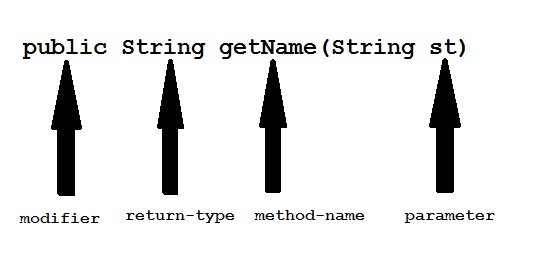
Modifier : Modifier are access type of method. We will discuss it in detail later.
Return Type : A method may return value. Data type of value return by a method is declare in method heading.
Method name : Actual name of the method.
Parameter : Value passed to a method.
Method body : collection of statement that defines what method does.

Parameter Vs. Argument

While talking about method, it is important to know the difference between two terms parameter and argument.
Parameter is variable defined by a method that receives value when the method is called. Parameter are always local to the method they dont have scope outside the method. While argument is a value that is passed to a method when it is called.
parameter and argument

call-by-value and call-by-reference

There are two ways to pass an argument to a method
  1. call-by-value : In this approach copy of an argument value is pass to a method. Changes made to the argument value inside the method will have no effect on the arguments.
  2. call-by-reference : In this reference of an argument is pass to a method. Any changes made inside the method will affect the agrument value.
NOTE : In Java, when you pass a primitive type to a method it is passed by value whereas when you pass an object of any type to a method it is passed as reference.

Example of call-by-value

public class Test
{
    public void callByValue(int x)
    {
        x=100;
    }
    public static void main(String[] args)
    {
       int x=50;
        Test t = new Test();
        t.callByValue(x); //function call
        System.out.println(x);
    }
    
}
Output :
50

Example of call-by-reference

public class Test
{
    int x=10;
    int y=20;
    public void callByReference(Test t)
    {
        t.x=100;
        t.y=50;
    }
    public static void main(String[] args)
    {
       
        Test ts = new Test();
        System.out.println("Before "+ts.x+" "+ts.y);
        ts.callByReference(ts);
        System.out.println("After "+ts.x+" "+ts.y);
    }
    
}
Output :
Before 10 20
After 100 50

Method overloading

If two or more method in a class have same name but different parameters, it is known as method overloading.
Method overloading is one of the ways through which java supports polymorphism. Method overloading can be done by changing number of arguments or by changing the data type of arguments. If two or more method have same name and same parameter list but differs in return type are not said to be overloaded method

Different ways of Method overloading

There are two different ways of method overloading

Method overloading by changing data type of Arguments

Example :
class Calculate
{
 void sum (int a, int b)
 {
  System.out.println("sum is"+(a+b)) ;
 }
 void sum (float a, float b)
 {
  System.out.println("sum is"+(a+b));
 }
 Public static void main (String[] args)
 {
  Calculate  cal = new Calculate();
  cal.sum (8,5);      //sum(int a, int b) is method is called. 
  cal.sum (4.6f, 3.8f); //sum(float a, float b) is called.
 }
}
Output :
Sum is 13
Sum is 8.4
You can see that sum() method is overloaded two times. The first takes two integer arguments, the second takes two float arguments.

Method overloading by changing no. of argument.

Example :
class Area
{
 void find(int l, int b)
 {
  System.out.println("Area is"+(l*b)) ;
 }
 void find(int l, int b,int h)
 {
  System.out.println("Area is"+(l*b*h));
 }
 public static void main (String[] args)
 {
  Area  ar = new Area();
  ar.find(8,5);     //find(int l, int b) is method is called. 
  ar.find(4,6,2);    //find(int l, int b,int h) is called.
 }
}
Output :
Area is 40
Area is 48
In this example the find() method is overloaded twice. The first takes two arguments to calculate area, and the second takes three arguments to calculate area.
When an overloaded method is called java look for match between the arguments to call the method and the method's parameters. This match need not always be exact, sometime when exact match is not found, Java automatic type conversion plays a vital role.

Example of Method overloading with type promotion.

class Area
{
 void find(long l,long b)
 {
  System.out.println("Area is"+(l*b)) ;
 }
 void find(int l, int b,int h)
 {
  System.out.println("Area is"+(l*b*h));
 }
 public static void main (String[] args)
 {
  Area  ar = new Area();
  ar.find(8,5);     //automatic type conversion from find(int,int) to find(long,long) . 
  ar.find(2,4,6)    //find(int l, int b,int h) is called.
 }
}
Output :
Area is 40
Area is 48
Read More »

Objects and Classes ~ GNIITHELP

Since Java is an object oriented language, complete java language is build on classes and object. Java is also known as a strong Object oriented programming language(oops).
OOPS is a programming approach which provides solution to problems with the help of algorithms based on real world. It uses real world approach to solve a problem. So object oriented technique offers better and easy way to write program then procedural programming model such as C, ALGOL, PASCAL.

Main Features of OOPS

  • Inheritence
  • Polymorphism
  • Encapsulation
  • Abstraction
As an object oriented language Java supports all the features given above. We will discuss all these features in detail later.

Class

In Java everything is encapsulated under classes. Class is the core of Java language. Class can be defined as a template/ blueprint that describe the behaviors /states of a particular entity. A class defines new data type. Once defined this new type can be used to create object of that type. Object is an instance of class. You may also call it as physical existence of a logical template class.
A class is declared using class keyword. A class contain both data and code that operate on that data. The data or variables defined within a class are called instance variables and the code that operates on this data is known as methods.

Rules for Java Class

  • A class can have only public or default(no modifier) access specifier.
  • It can be either abstract, final or concrete (normal class).
  • It must have the class keyword, and class must be followed by a legal identifier.
  • It may optionally extend one parent class. By default, it will extend java.lang.Object.
  • It may optionally implement any number of comma-separated interfaces.
  • The class's variables and methods are declared within a set of curly braces {}.
  • Each .java source file may contain only one public class. A source file may contain any number of default visible classes.
  • Finally, the source file name must match the public class name and it must have a .java suffix.

A simple class example

Suppose, Student is a class and student's name, roll number, age will be its property. Lets see this in Java syntax
class Student.
{
 String name;
 int rollno;
 int age;
}
When a reference is made to a particular student with its property then it becomes an object, physical existence of Student class.
Student std=new Student();
After the above statement std is instance/object of Student class. Here the new keyword creates an actual physical copy of the object and assign it to the std variable. It will have physical existence and get memory in heap area. The new operator dynamically allocates memory for an object
creation of object in java

Q. How a class is initialized in java?

A Class is initialized in Java when an instance of class is created using either new operator or using reflection using class.forName(). A class is also said to be initialized when a static method of Class is invoked or a static field of Class is assigned.

Q. How would you make a copy of an entire Java object with its state?

Make that class implement Cloneable interface and call clone() method on its object. clone() method is defined in Object class which is parent of all java class by default.
Read More »

Operators in Java ~ GNIITHELP

Java Operators

Java provides a rich set of operators enviroment. Java operators can be devided into following categories
  • Arithmetic operators
  • Relation operators
  • Logical operators
  • Bitwise operators
  • Assignment operators
  • Conditional operators
  • Misc operators

Arithmetic operators

Arithmetic operators are used in mathematical expression in the same way that are used in algebra.
operatordescription
+adds two operands
-subtract second operands from first
*multiply two operand
/divide numerator by denumerator
%remainder of division
++Increment operator increases integer value by one
--Decrement operator decreases integer value by one

Relation operators

The following table shows all relation operators supported by Java.
operatordescription
==Check if two operand are equal
!=Check if two operand are not equal.
>Check if operand on the left is greater than operand on the right
<Check operand on the left is smaller than right operand
>=check left operand is greater than or equal to right operand
<=Check if operand on left is smaller than or equal to right operand

Logical operators

Java supports following 3 logical operator. Suppose a=1 and b=0;
operatordescriptionexample
&&Logical AND(a && b) is false
||Logical OR(a || b) is true
!Logical NOT(!a) is false

Bitwise operators

Java defines several bitwise operators that can be applied to the integer types long, int, short, char and byte
operatordescription
&Bitwise AND
|Bitwise OR
^Bitwise exclusive OR
<<left shift
>>right shift
Now lets see truth table for bitwise &, | and ^
aba & ba | ba ^ b
00000
01011
10011
11110
The bitwise shift operators shifts the bit value. The left operand specifies the value to be shifted and the right operand specifies the number of positions that the bits in the value are to be shifted. Both operands have the same precedence.Example
a = 0001000
b= 2
a << b= 0100000
a >> b= 0000010 

Assignment Operators

Assignment operator supported by Java are as follows
operatordescriptionexample
=assigns values from right side operands to left side operanda=b
+=adds right operand to the left operand and assign the result to lefta+=b is same as a=a+b
-=subtracts right operand from the left operand and assign the result to left operanda-=b is same as a=a-b
*=mutiply left operand with the right operand and assign the result to left operanda*=b is same as a=a*b
/=divides left operand with the right operand and assign the result to left operanda/=b is same as a=a/b
%=calculate modulus using two operands and assign the result to left operanda%=b is same as a=a%b

Misc operator

There are few other operator supported by java language.

Conditional operator

It is also known as ternary operator and used to evaluate Boolean expression
epr1 ? expr2 : expr3
If epr1Condition is true? Then value expr2 : Otherwise value expr3

instanceOf operator


This operator is used for object reference variables. The operator checks whether the object is of particular type (class type or interface type)
Read More »

Java Array ~ GNIITHELP

Concept of Array in Java

An array is a collection of similar data types. Array is a container object that hold values of homogenous type. It is also known as static data structure because size of an array must be specified at the time of its declaration.
An array can be either primitive or reference type. It gets memory in heap area. Index of array starts from zero to size-1.

Array Declaration

Syntax :
datatype[ ] identifier;
or
datatype identifier[ ];
Both are valid syntax for array declaration. But the former is more readable.
Example :
int[ ] arr;
char[ ] arr;
short[ ] arr;
long[ ] arr;
int[ ][ ] arr;   // two dimensional array.

Initialization of Array

new operator is used to initialize an array.
Example :
int[ ] arr = new int[10];    //10 is the size of array.
or
int[ ] arr = {10,20,30,40,50};

Accessing array element

As mention ealier array index starts from 0. To access nth element of an array. Syntax
arrayname[n-1];
Example : To access 4th element of a given array
int[ ] arr = {10,20,30,40};
System.out.println("Element at 4th place" + arr[3]);
The above code will print the 4th element of array arr on console.

foreach or enhanced for loop

J2SE 5 introduces special type of for loop called foreach loop to access elements of array. Using foreach loop you can access complete array sequentially without using index of array. Let us see an example of foreach loop.
class Test
{
public static void main(String[] args)
  {
    int[] arr = {10, 20, 30, 40};
 for(int x : arr)
 {
  System.out.println(x);
 }
   }
}
Output :
10
20
30
40

Read More »