Showing posts with label java project. Show all posts

Friday, 11 August 2017

Best web browser for Android Tablet and Smartphone 2017 ~ gniithelp

Best web browser for Android
Smartphones Smartphones everywhere, But no good browser to use. We have wide variety of smartphones now. They are increasing in number day by day. The growth is exponentially increasing. We have hundreds of applications over play store. Most of them are free but the paid ones are also good. We have application for almost everything now say its medical, shopping, ticket booking etc etc. but we cant do everything in apps only.
A good browser is as important as a good smartphones. Where ever we are stuck or in whatever confusion we face with situations we just click on our web browser Google it or whatever is necessary. There are many browsers available over internet and Google play store. There are times when we get stuck between redirects because of apps, mobile sites and link  Shortners. I have been facing this problem so many times that sometimes a browser is not good enough too any adds pop up they redirect you to some advertisements and you are annoyed. Well don’t think too much because this one is quick and easy.

Best web browser for Android Tablet

Link Bubble.. it is increasing the numbers of downloads after users come across it and find it working really good. It is really rolling very good on Google play store. It is an awesome floating browser. It looks good and feels good to. Let’s roll over to its feature and installation procedure.

Step to install link bubble browser in Android Tablet

Step 1: go to Google play store option in your phone.
Step 2: Enter the name “link bubble” in the search option provided above in the right most corner. Do prefer search one because searching manually consumes too much of time.
Screenshot_2015-01-21-15-08-57[1]
Step 3: lite version one is paid and pro version is freely available. Select the one you wish to use.
Step 4: Install it, accept the provided options and use it.
Screenshot_2015-01-21-15-10-31[1]
Read More »

Wednesday, 2 August 2017

BabyCare Servlet Project java ~ gniithelp

BabyCare Servlet Project


Objective/ Vision

A software product which provides solution for baby health, baby food, baby tips, baby products, baby names, parenting etc. Here, user can view baby names, baby names by religion, baby tips, baby food and baby product. Admin can add and delete baby names.

Live URL

www.babycaresolution.com

Users of the System

  1. Admin
  2. Users

Functional Requirements

1. Admin
  1. Can login and logout.
  2. Can add baby names.
  3. Can view baby names.
  4. Can delete baby names.
  5. Can add new pages.
2. Users
  1. Can view baby names.
  2. Can view baby tips.
  3. Can view baby food.
  4. Can view baby products.

Non-Functional Requirements

  1. Secure access of confidential data (user?s details). SSL can be used.
  2. 24 X 7 availability
  3. Browser testing and support for IE, NN, Mozila, and Firefox
  4. Reports exportable in .XLS, .PDF
  5. Create a detailed UML diagram (Component, Sequence, Class) for the system and its sub-components

User Interface Priorities

  1. Professional look and feel
  2. Use of AJAX atleast with all registration forms and with every search option and at the id of each searched result with onmouseover event.

Tools to be used

  1. Use any IDE to develop the project. It may be Myeclipse / Eclipse / Netbeanse.
  2. Oracle 10g for the database.
  3. Server: Apache Tomcat/JBoss/Glassfish/Weblogic/Websphere.

Front End and Back End

  1. Front End: JSP, JDBC, Javascript, AJAX
  2. Back End: Oracle10g

How project works?

To get detail explanation about project download the document file. It includes snapshots with explanation.

Software Requirement to run this project

  1. You need to install an IDE Eclipse / Myeclipse / Netbeans.
  2. MySQL database. (Here, we are not using any username and password for MySQL database).

How to run this project

1) Import the SQL file in MySQL (located in Web-Content directory)
2) Paste mysql-connector.jar file inside lib directory.
3) Import the project on the Eclipse IDE and run it.

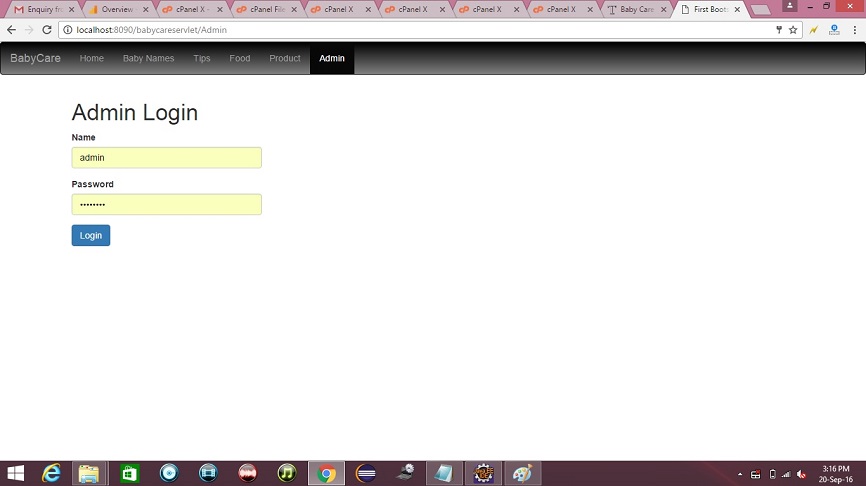
Password for Admin

Username is admin and password is admin123.

Welcome Page


credit :- javatpoint

Read More »

Online Library Project java ~ gniithelp

Online Library Project


The description of the project will be available soon. But you can download the project.

Non-Functional Requirements

  1. Secure access of confidential data (user?s details). SSL can be used.
  2. 24 X 7 availability
  3. Browser testing and support for IE, NN, Mozila, and Firefox
  4. Reports exportable in .XLS, .PDF
  5. Create a detailed UML diagram (Component, Sequence, Class) for the system and its sub-components

User Interface Priorities

  1. Professional look and feel
  2. Use of AJAX atleast with all registration forms and with every search option and at the id of each searched result with onmouseover event.
-->

Tools to be used

  1. Use any IDE to develop the project. It may be Myeclipse / Eclipse / Netbeanse.
  2. Oracle 10g for the database.
  3. Server: Apache Tomcat/JBoss/Glassfish/Weblogic/Websphere.

Front End and Back End

  1. Front End: JSP, JDBC, Javascript, AJAX
  2. Back End: Oracle

How project works?

To get detail explanation about project download the document file. It includes snapshots with explanation.

Software Requirement to run this project

  1. You need to install an IDE Eclipse / Myeclipse / Netbeans.
  2. Oracle 10g database. Here, we are using system for the username and oracle for the password.

Hot to run this project

Import the project on the IDE and run it. All the tables will be created automatically.

Welcome Page


credit :- javatpoint
Read More »